on
Caching MPS Build Output in GitHub Actions
Rationale
It’s 16:30 on a slow Wednesday, you’re finishing up your pull request for the day. You get a comment, requesting to change the name of a variable so it’s easier to understand. Sure, your commit takes 10 seconds to finalize. And now you have to wait 30 minutes for the build, staring through the window and waving the colleagues goodbye one by one.
GitHub Actions has a caching mechanism and MPS generated output is exactly the kind of "expensive to produce, cheap to store" artifact that benefits from caching.
A match made in heaven.
This post is a checklist for setting it up and a summary of the gotchas we hit along the way.
The Problem
The project is the domain experts side, so it has no language modules, just solutions. It uses Maven, it has tens of solutions with hundreds of models. Lots of people work on separate branches, this means a lot of repeat building of mostly the same things.
On every push, we start a fresh runner, it pulls the dependencies, starts MPS and starts chugging through generators. This happens on a 1 line change, and on a 100 lines change.
The Approach
Persist the generated output between runs and only regenerate what has actually changed.
GitHub Actions provides actions/cache for storing files in the GitHub Cache.
However, as is with everything MPS, it’s not that simple.
MPS generated output directories (source_gen, classes_gen, source_gen.caches, test_gen and test_gen.caches) sit in the same folder as the module file and model directories.
So we have to pick which directories will be saved.
To solve this, we ended up with two composite actions:
-
restore-mps-cache— runs before the build, restores cached generated output. -
save-mps-cache— runs after the build, saves the new generated output if it’s new.
Both are called from inside our build-mps composite action, so the caching logic stays out of the main pipeline file.
Splitting Save and Restore
The standard GitHub action actions/cache@v5 handles both restore and save in a single step, but it gives us less control.
So we decided to re-use its components, actions/cache/restore and actions/cache/save, separately. That way we can skip the save when the restore was a full cache hit (no point re-saving identical content).
Cache files are branch specific so if we save identical cache files in separate branches they will consume extra space on the disk. We tried to handle this as much as possible using restore keys, because our project is storage hungry.
name: restore-mps-cache
description: >-
  Restores MPS generated output [source_gen(.caches), classes_gen, test_gen(.caches)] under {your-mps-project-base-path}/.

inputs:
  mps-cache-key:
    description: Cache key for MPS generated output
    required: true
  mps-cache-restore-keys:
    description: Fallback restore keys for MPS cache (newline-separated)
    required: false
    default: ''

outputs:
  mps-cache-hit:
    description: Whether an MPS cache was restored
    value: ${{ steps.restore_mps.outputs.cache-matched-key != '' }}

runs:
  using: composite
  steps:
    - name: Restore MPS Generated Output
      id: restore_mps
      uses: actions/cache/restore@v5
      with:
        path: ${{ github.workspace }}/mps-gen-cache.tar.zst
        key: ${{ inputs.mps-cache-key }}
        restore-keys: ${{ inputs.mps-cache-restore-keys }}

    - name: Unpack MPS Generated Output
      if: steps.restore_mps.outputs.cache-hit == 'true'
      shell: bash
      run: |
        tar -x --zstd \
        -f ${{ github.workspace }}/mps-gen-cache.tar.zst \
        -C ${{ github.workspace }}
actions/cache/restore@v5 has had reliability issues.
If you hit weird "cache not found" errors despite the entry visibly existing, this is a candidate for investigation.
|
Tarring the Generated Output
The first wall we hit was an Argument list too long error from the cache action.
Our project produces around 350 individual _gen directories, and passing all of them as a list of paths to the cache action exceeded the OS argument limit.
The fix is to tar everything into a single archive before saving and untar it on restore.
name: save-mps-cache
description: >-
  Saves MPS generated output [source_gen(.caches), classes_gen, test_gen(.caches)] under {your-mps-project-base-path}/.

inputs:
  mps-cache-key:
    description: Cache key for MPS generated output
    required: true
  mps-cache-hit:
    description: Whether a full cache hit occurred during restore. Skips save if true.
    required: false
    default: 'false'

runs:
  using: composite
  steps:
    - name: Archive MPS Generated Output
      if: inputs.mps-cache-hit != 'true'
      shell: bash
      run: |
        find ${{ github.workspace }}/{your-mps-project-base-path} \
        -mindepth 2 -maxdepth 2 -type d \( -name 'source_gen' -o -name 'classes_gen' -o -name 'source_gen.caches' -o -name 'test_gen' -o -name 'test_gen.caches' \) \
        -print0 | sed -z "s|${{ github.workspace }}/||" | \
        tar -c -I"zstd -19 -T0" \
        -f ${{ github.workspace }}/mps-gen-cache.tar.zst \
        -C ${{ github.workspace }} \
        --null --files-from=-
    - name: Save MPS Generated Output
      if: inputs.mps-cache-hit != 'true'
      uses: actions/cache/save@v5
      with:
        path: ${{ github.workspace }}/mps-gen-cache.tar.zst
        key: ${{ inputs.mps-cache-key }}
The archiving step is quite big, so I’ll explain everything:
-
finduses-mindepth 2 -maxdepth 2to target only the top-level gen directories under each solution, not their contents.
| If you are going to implement this on a project with languages and generators, you have to also include the generator folders, which are usually inside {mps-language}/{generator}/*_gen, so the find command has to be extended for deeper searching. This might look like just extending the -maxdepth property to 4 but if your project is big, it might need more thought. |
-
-type d \( -name 'source_gen' -o -name 'classes_gen' -o -name 'source_gen.caches' -o -name 'test_gen' -o -name 'test_gen.caches' \)specifies we are looking for directories with these names, I decided to specify them explicitly so we don’t catch anything else by accident. -
-print0makesfinddelimit its output with null bytes (\0) instead of newlines. The default newline delimiter breaks if any of the paths contain whitespaces. -
sed -z "s|${{ github.workspace }}/||"substitutes everything up to and including${{ github.workspace }}/so we work in the path relative to the workspace root.-zmakessedtreat null bytes as record separators. -
tar -c -I"zstd -19 -T0":-ccreates a new archive using thezstdcompressor at-19compression level and-T0to use all available CPU cores.
| Make sure the same compression flag is used on both ends. Mixing (de)compression algorithms will give you a fun afternoon. |
Cache Keys and Branch Scoping
GitHub caches are scoped per branch by default.
A cache saved on feature-a is not visible from feature-b.
Caches saved on the default branch are restorable from all branches.
We use a key that includes the runner OS, branch name, language version and a hash of the build model files:
mps-cache-key: ${{ runner.os }}-mps-cache-${{ github.ref_name }}-${{ steps.prepare_job.outputs.language-version }}-${{ hashFiles('{your-mps-project-base-path}/build-solutions/**/models/*.mps') }}
mps-cache-restore-keys: ${{ runner.os }}-mps-cache-main-${{ steps.prepare_job.outputs.language-version }}-${{ hashFiles('{your-mps-project-base-path}/build-solutions/**/models/*.mps') }}
We use the build models so we can capture caches using the dependencies of the project modules. The hash ensures we only ever restore a cache that matches the current version and set of dependencies. This decreases the chance of us using stale caches and breaking our builds, but also ensures we get hits and not have different hashes on every change.
The mps-cache-restore-keys provides a fallback to the most recent cache from main when a branch has no cache of its own yet.
| If you scope by branch only and not by content hash, there is a greater chance that a stale cache will break your build the moment a model is changed. |
Compression Choice
Our first version used xz (-cJf), but we found a better option.
After comparing other algorithms, I found that zstd -19 wins for our case.
It achieved near-identical size to xz, while compressing much faster, and size is the deciding factor when we are trying to fit 50 cache items in 10GB.
| Algorithm | Compress | Decompress | Size |
|---|---|---|---|
xz |
9m51s |
25s |
99MB |
gzip |
42s |
16s |
198MB |
zstd (default) |
6s |
11s |
171MB |
zstd -19 |
6m36s |
13s |
95MB |
| zstd should be available on GitHub-hosted Ubuntu runners by default. Verify on your specific runner image before relying on it. |
Putting It All Together
Here is what the full caching flow looks like inside a composite action:
name: run-mps-build

inputs:
  use-mps-cache:
    description: Use cache when rebuilding MPS sources for quicker pipeline runs
    required: true
  mps-cache-key:
    description: Cache key for MPS generated output
    required: true
  mps-cache-restore-keys:
    description: Fallback restore keys for MPS cache (newline-separated)
    required: false
    default: ''

runs:
  using: composite
  steps:
    - name: Restore MPS cache
      if: inputs.use-mps-cache == 'true'
      id: restore_mps
      uses: ./.github/actions/restore-mps-cache
      with:
        mps-cache-key: ${{ inputs.mps-cache-key }}
        mps-cache-restore-keys: ${{ inputs.mps-cache-restore-keys }}

    - name: Run MPS build
      # ... your build steps here ...

    - name: Save MPS cache
      id: save_mps
      uses: ./.github/actions/save-mps-cache
      with:
        mps-cache-key: ${{ inputs.mps-cache-key }}
        mps-cache-hit: ${{ steps.restore_mps.outputs.mps-cache-hit }}
The project is split into DSL MPS project and the user models MPS project.
On the user models project which depended on the DSL project we added another check to both cache steps: is-snapshot.
    - name: Restore MPS cache
      if: inputs.use-mps-cache == 'true' && inputs.is-snapshot != 'true'
      id: restore_mps
      uses: ./.github/actions/restore-mps-cache
      with:
        mps-cache-key: ${{ inputs.mps-cache-key }}
        mps-cache-restore-keys: ${{ inputs.mps-cache-restore-keys }}

    - name: Run MPS build
      # ... your build steps here ...

    - name: Save MPS cache
      if: inputs.is-snapshot != 'true'
      id: save_mps
      uses: ./.github/actions/save-mps-cache
      with:
        mps-cache-key: ${{ inputs.mps-cache-key }}
        mps-cache-hit: ${{ steps.restore_mps.outputs.mps-cache-hit }}
We decided to not use cache if our language version was a SNAPSHOT, because the developer team used SNAPSHOTs for quick patches and testing. Using the cache for such versions increased the chances of using stale code and masking the changes a developer was trying to test, so we decided to not run it at all.
Enable MPS skip unmodified models property
This is the backbone of the entire operation.
None of this would matter if MPS just regenerates everything over the cache files anyway. We have to tell it via the build script to skip unmodified models.
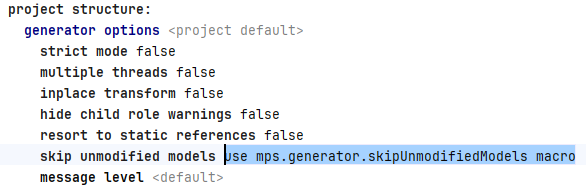
Implementation Checklist
-
Find the "Build MPS" action in your pipeline.
-
Define
mps-cache-keyinput. -
Optionally define
mps-cache-restore-keysto fall back to the most recent visible cache. -
Write
restore-mps-cacheGitHub action yml file. -
Write
save-mps-cacheGitHub action yml file. -
Call the
restore-mps-cacheaction before the build step. -
Call the
save-mps-cacheaction after the build step. -
Verify the cache was saved under Actions → Caches in the GitHub UI.
-
Add conditional input
use-mps-cachefor explicit control over cache usage. -
Add conditional input
is-snapshotfor user model projects for extra checks during debugging. -
Enable
skip unmodified modelsgenerator option in your MPS build script.
Pitfalls and Gotchas
Argument List Too Long
If the cache action complains about argument length, you’re trying to cache too many individual paths. Tar them into one file.
Cache Immutability
GitHub does not let you overwrite an existing cache key. Same key means same content, by design. If you want to "update" a cache, you have two options:
-
Append a unique element to the key (run ID, commit SHA) and use
restore-keysfor prefix matching to grab the most recent. New entry every run. -
Delete the existing entry before saving. Useful when you want exactly one entry per branch to keep storage bounded.
Path Mismatches Between Save and Restore
Make sure your save and restore actions use the same properties, glob patterns and paths. Mismatches here will silently produce a cache that "exists" and still build everything from scratch since it’s put somewhere else.
| Add a debug step that prints the exact paths being cached and the exact paths being looked up. |
GitHub Actions total cache storage
GitHub Action’s default cache storage limit is 10GB. This is not a lot considering the ~50 branches that people are working on. Each branch would potentially have its own cache, so we have to use maximum compression, even if it makes it significantly slower (see [compression-comparison]).
| Entries not used for 7 days are deleted, long-lived feature branches may have to re-save their cache occasionally. |
Stale Caches Breaking the Build
The cache key must include a hash of the actual model files, not just the branch name.
A branch-only key will happily restore yesterday’s source_gen over today’s models, and MPS will either fail or produce wrong output.
The hash is what makes the cache safer.
Random build failures
We occasionally got build failures that seemed random and were resolved once we re-ran the build without cache. This was happening on MPS 2025.1.1, the problem was found to be a transitive dependency bug that was being resolved by one of the other teams.
In the meantime I came up with a retry step that could alleviate the users' failing builds without them having to re-run them manually. The solution is a Band-Aid so be careful when using it, but it worked for us.
    - name: Run mvn build
      continue-on-error: true
      id: mvn_build
      # ... your build steps here ...

    - name: Retry without cache
      id: retry
      if: steps.mvn_build.outcome == 'failure' && steps.restore_mps.outputs.mps-cache-hit == 'true'
      uses: ./.github/actions/retry-mvn-build-without-cache
      with:
        phase: ${{ inputs.phase }}
        mps-cache-key: ${{ inputs.mps-cache-key }}

    - name: Surface build failure
      if: steps.mvn_build.outcome == 'failure' && steps.restore_mps.outputs.mps-cache-hit != 'true'
      shell: bash
      run: |
        echo "Build failed and no cache was used — this is a genuine build failure."
        exit 1
A word on how the failure handling works, because it’s easy to break.
The mvn build step uses continue-on-error: true.
This is deliberate: it stops a failed build from immediately failing the job, so we get a chance to retry without the cache.
The downside is that the build step alone can never fail the job anymore, so we need the two steps that follow it to decide the actual outcome.
There are three cases:
-
Build succeeds — neither follow-up step runs, the job passes.
-
Build fails with a cache hit — the retry step runs, deletes the poisoned cache, wipes the generated output, and rebuilds from a clean state. The retry’s own success or failure becomes the job’s result.
-
Build fails without a cache hit — there’s nothing to blame the cache for, so this is a genuine failure. The "Surface build failure" step runs
exit 1to fail the job, since the build step no longer can.
If you remove continue-on-error: true, the build will fail the job before the retry ever gets a chance to run, defeating the whole point.
And if you add it without the "Surface build failure" step, genuine failures will pass silently.
The three pieces only work together.
|
The condition on the surface step (mps-cache-hit != 'true') also catches the case where caching is disabled and the step correctly fails the cache-less job.
So a real failure is always surfaced whether the cache was in play.
retry build without cache action
name: retry-mvn-build-without-cache
description: >-
  Recovers from a failed mvn build that used the MPS cache. Deletes the
  poisoned cache entry, wipes MPS generated output, and retries the build
  from a clean state. Fails if the retry also fails.

inputs:
  phase:
    description: mvn goals to execute
    required: true
  mps-cache-key:
    description: Cache key of the poisoned entry to delete
    required: true

runs:
  using: composite
  steps:
    - name: Annotate cache-poisoning recovery
      shell: bash
      run: echo "::warning title=MPS cache poisoning detected::Build failed on first attempt with cache key '${{ inputs.mps-cache-key }}'. Retrying without cache."

    - name: Delete poisoned cache entry
      shell: bash
      env:
        GH_TOKEN: ${{ github.token }}
        CACHE_KEY: ${{ inputs.mps-cache-key }}
        REPO: ${{ github.repository }}
      run: |
        echo "Build failed with cache hit. Deleting cache entry: ${CACHE_KEY}"
        gh cache delete "${CACHE_KEY}" --repo "${REPO}" \
          || echo "Cache delete failed (entry may already be gone); continuing."

    - name: Wipe MPS generated output
      shell: bash
      run: |
        echo "Removing MPS generated directories before retry."
        find ${{ github.workspace }}/{your-mps-project-base-path} \
          -mindepth 2 -maxdepth 2 -type d \
          \( -name 'source_gen' -o -name 'classes_gen' -o -name 'source_gen.caches' -o -name 'test_gen' -o -name 'test_gen.caches' \) \
          -exec rm -rf {} +

    - name: Retry mvn clean + build without cache
      id: mvn_retry
      shell: bash
      run: |
        mvn -B clean compile  # replace with your build goals; keep `clean`
Results
In optimal conditions — meaning a full cache hit on a branch with no model changes — the Build Phase dropped from 15 minutes to 5 minutes. Roughly a third of the original time, with most of what remained being the actual Java compilation and packaging.
Cache hits scale with how stable your models are between runs. Branches with lots of model changes will see less benefit because they invalidate the cache more often. But for the typical case of "domain expert changes a few models, the rest are untouched," the speedup is substantial.
Closing Thoughts
Most of the difficulty here came not from the caching itself but from the layers of abstractions we had to peel back: composite actions inside composite actions, MPS generating output in 350 places, GitHub’s branch scoping, immutability rules, and the cache action’s quirks around path handling. Once each of those is understood, the actual code is fairly small.
If you find yourself optimising MPS pipelines and want to share something we missed, I’d love to hear about it, you can find my email below.
About Atanas Marchev
I am a Model Driven Engineer at F1RE. I started my journey with F1RE in December 2021. I’ve worked with many aspects of programming and this way of development seems very interesting. Just the thought alone of the way one has to extract basic concepts out of complex ideas and structures seems challenging enough to make your head spin.
You can contact me at atanas@f1re.io.