Localization (UI language)
Audience: everyone, and translators · ~7 min read · Prerequisites: Screen map
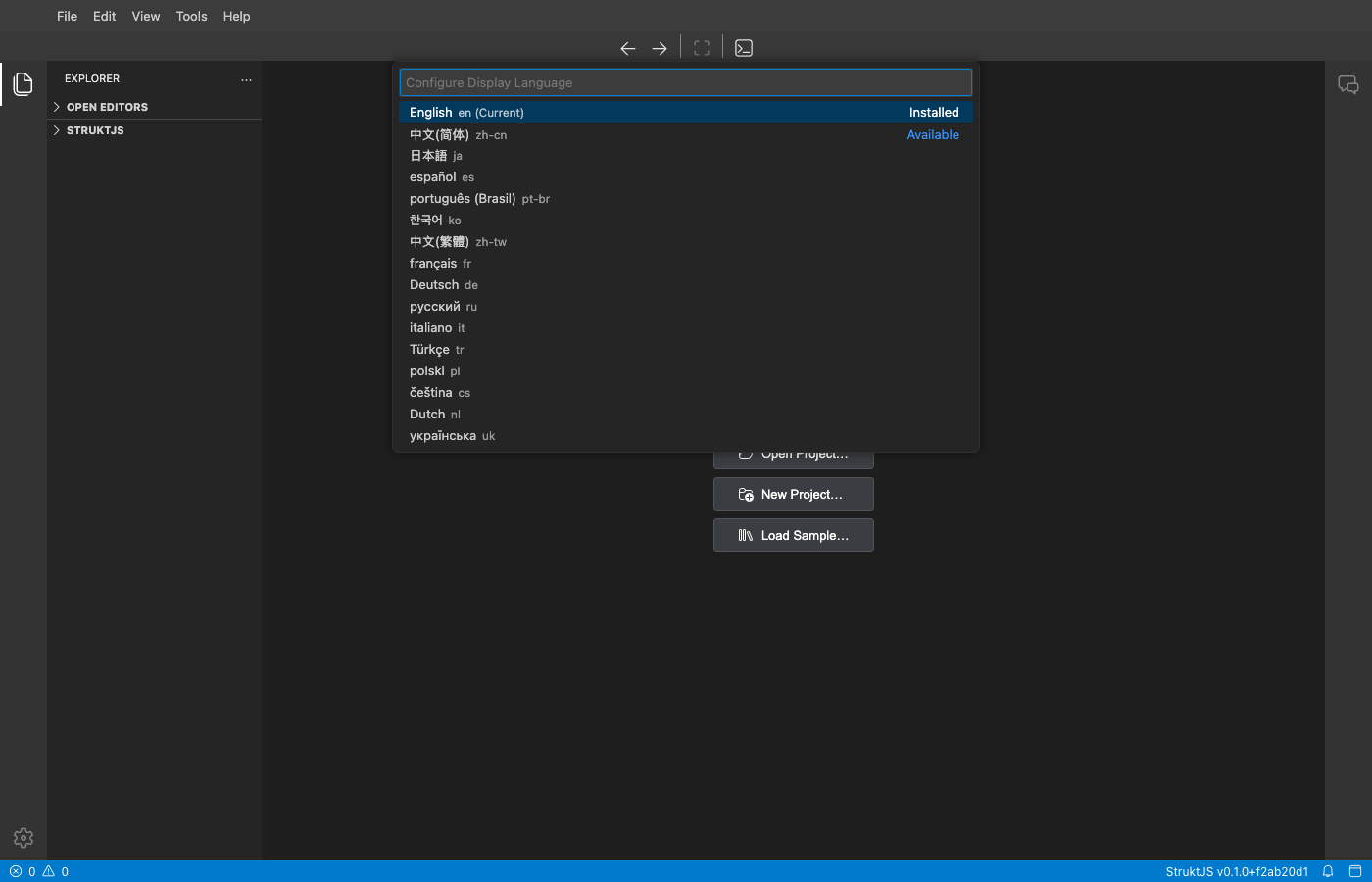
What it is
struktJS can show its interface in more than one language. Localization (also called translation) means the menus, buttons, dialogs and messages are shown in your language instead of English. Two systems work together, and neither is automatic for every language:
- Theia's display language. The IDE shell around struktJS (the Command Palette, the Settings editor, built-in menus, the Terminal and so on) is translated by Theia language packs. You choose the language with Configure Display Language.
- struktJS's own translations. struktJS's own menus, commands, panes, dialogs and messages are translated
from dictionaries that ship inside the app. Today there are two: German (
de) and Dutch (nl). Anything not in a dictionary, and every other language, falls back to English.
The editor language you use to write models (Python, JavaScript and so on) is unrelated to the UI language.
When you'd use it
- You or your team would rather work in German or Dutch.
- You want Theia's own menus and settings in another language (for example French or Japanese), accepting that struktJS's own text stays English.
- You want to contribute a translation (see below).
Switch the UI language
- Press F1 to open the Command Palette and run Configure Display Language.
- Pick a language from the list. Languages already on your machine are listed under Installed; the others under Available are downloaded as a language pack the first time you pick them (this needs access to the extension registry the IDE is configured with).
- Reload the window when Theia asks you to (if it does not, reload the page or restart the desktop app yourself). struktJS reads the language once at start-up, so the change takes effect after the reload.
- To go back, run Configure Display Language again and pick English.
Theia remembers the choice in the browser (localeId in local storage) and, on the desktop app, in the app's
profile. If you pick de or nl, struktJS's own text switches to German or Dutch too. For any other
language, Theia's shell changes but struktJS's text stays English.
Language codes are matched on their first part: for example de-AT would use the German dictionary.
Standalone web preview
Without Theia there is no picker. The preview reads the browser's local storage key struktjs-locale (set
it to de or nl) and falls back to English.
What is translated, and what is not
| Area | Translated? |
|---|---|
| struktJS menus, command names, toolbar and status bar | Yes for de and nl |
| struktJS panes, dialogs, prompts and toast messages (Preferences, Collaboration, Tests, Git, and so on) | Mostly yes for de and nl |
| Theia's own shell (Command Palette, Settings editor, Terminal) | Yes, for each language Theia has a pack for |
| Preference names and help text | Yes for de and nl (the struktJS.* setting ids never change) |
| Language plugins: concept names, editor layouts, check and constraint messages, sample content | No, English |
| The documentation site and in-app Docs tab | No, English |
| Spell-check language (the Spell-check language preference) | Separate setting: English or Off |
| Strings inside your models | Never touched |
Coverage is incomplete even for German and Dutch: the dictionaries hold 802 entries each, while the app
contains about 1,200 distinct translatable strings, so roughly 490 still show in English. A missing entry
simply shows in English, so you can always use the app. node scripts/i18n-coverage.mjs --list prints exactly
which strings are missing.
How translations are packaged
- Each language is one JSON file in the source tree:
theia-extension/src/shared/i18n-de.jsonandi18n-nl.json. The English text is the key; the value is the translation. Placeholders such as{name}or{roomId}stay exactly as they are and are filled in at run time. - The files are compiled into the app. They are not loaded at run time, so adding or fixing a translation needs a new build. You cannot drop a file into a folder.
- Theia language packs are separate VS Code extensions. The browser and desktop builds bundle a Dutch pack
(
babbelaar.babbelaar-vscode-language-pack-nl); other packs are downloaded on demand from the registry. A customer build can leave the Dutch pack out.
Contribute a translation
You do not need to write code to translate: you edit a JSON file. To add a new language, such as French:
- Copy
theia-extension/src/shared/i18n-de.jsontoi18n-fr.json. - Replace every value with the French text. Keep the keys and any
{placeholder}untouched. Leave a value equal to the key if a term should stay in English. - Register the language in
theia-extension/src/shared/i18n.ts: add"fr"to theLocaletype, import the JSON, and add it to theDICTStable. The locale list used at start-up is derived fromDICTS, so nothing else needs a list. - For a language Theia does not offer a pack for yet, nothing more is needed. If you also want the Theia shell
translated and offline, add the matching language-pack extension to
theiaPluginsintheia-app/package.jsonandtheia-electron-app/package.jsonthe way the Dutch pack is. - Build, run Configure Display Language, pick your language, reload, and check the menus and dialogs.
- Send your change as a pull request. Improving
deandnl(more entries, better wording) is just as welcome.
Tip: search a string's English text in the source to see where it appears before you translate it.
Known gaps
node scripts/i18n-coverage.mjs --listlists the strings still missing per language, entries identical to the English key, entries no longer used, and entries whose{placeholder}set differs from the key's. A test (tests/test-i18n-coverage.mjs) only lets the number of missing strings shrink, never grow.- A few entries in
deandnlare identical to the English key (31 and 50 today). Some are proper nouns or loanwords; others may simply be untranslated. - Language plugins and the documentation are English only.
Every control
| # | Button / option | What it does | Shortcut | Gotcha |
|---|---|---|---|---|
| 1 | Configure Display Language (Command Palette) | Lists languages and sets Theia's display language. | F1, then type the name | Needs a reload. Downloads a pack for languages not yet installed. |
| 2 | English (Current) / Installed / Available groups | Show what is on your machine and what can be downloaded. | none | The current language is marked. |
| 3 | Reload (or restart) | Applies the new language. | none | struktJS reads the language only at start-up. |
| 4 | struktjs-locale (standalone preview only) |
Browser local storage value de or nl. |
none | Ignored in the IDE. |