struktJS
struktJS is a projectional language workbench: you edit programs as a live, structured tree instead of as a string of characters. The tree is drawn like everyday Python, so it looks familiar, but every keystroke changes a node in the tree, so the program is always structurally valid. You can define your own languages for it.
It comes in two forms built from the same code. As packages it is a toolkit: an engine that checks, runs and generates models, a projectional editor you can put in your own web page, a command-line tool, and each language as a package you add or leave out (see Packages and what depends on what). As an IDE it is one program assembled from those pieces, running in a web browser or as a desktop app. This guide starts with the IDE, because that is where most people begin.
See it
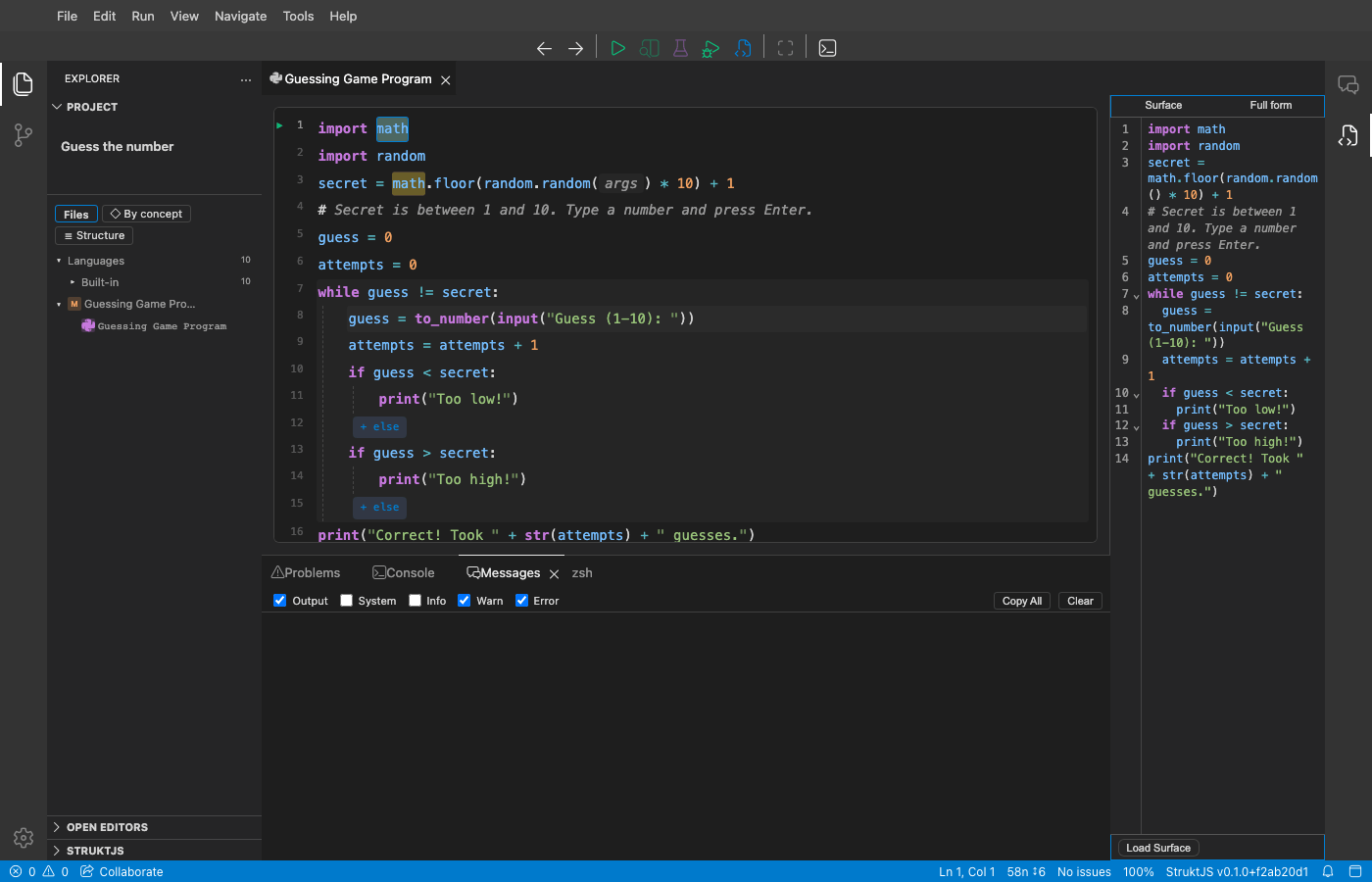
The left side is the projectional editor. The right side is the Surface pane, which shows the same
program as plain text. Both show the "Guess the number" sample. When you save, the program is stored as an
ordinary text file, a .model.py file, that looks like this:
# langversion: 1

import math
import random
secret = math.floor(random.random() * 10) + 1
guess = 0
attempts = 0
while guess != secret:
  guess = to_number(input("Guess (1-10): "))
  attempts = attempts + 1
  if guess < secret:
    print("Too low!")
(The file continues; this is the start of it.) Any text tool and git can read that file. Only the way you
edit it is different: you fill in cells and structure rather than typing characters that must be parsed.
I want to...
| I want to try it | I want to build a language | I want to work with others |
|---|---|---|
| Install struktJS, open a finished example, change it and run it in about five minutes. | Define your own concepts, how they look, how they are checked and what they generate. | Edit one model live with other people, see their cursors and leave comments. |
| Start here: I edit and run models | Start here: I build languages | Live Model Session |
Writing a plugin for struktJS? See Start here: I write a plugin. Running struktJS in CI, a web page or a branded product, or building on it as a toolkit? See Start here: I run it in a pipeline or a product and Packages and what depends on what.
What is a projectional editor?
In a text editor your program is a string of characters. It is turned into a tree only when something reads it, so it can be broken at any moment while you type: a missing bracket, a half-written keyword.
In a projectional editor the program is the tree. What you see (keywords, operators, indentation) is a
projection of the tree, drawn by rules the language author writes once. Typing edits nodes and the empty
slots between them, so the document never contains a half-typed if. See the
Glossary for words such as node, slot and cell.
struktJS still stores programs as real source text. A model's root is saved as a .model.py file (Python
syntax) or a .model.js file (JavaScript syntax) next to a small model.json. That is why programs diff
cleanly in git. The page The model file format explains what is safe to edit by
hand.
What you get
- Projectional editing with a completion menu, side-transformations (type
+afterxto getx + _) and undo. Start with Editor basics. - Pluggable languages. Concepts, checks, constraints, a gradual type system, scope analysis and generators are defined per language. Core, a Python-like language, is built in, with many demo languages. See Bundled languages.
- Run, debug and generate. Run programs, step through them in a debugger, generate code or a live preview, and run language tests. See Running a model.
- Projects and models that live in plain folders, with AST-aware git diffs. See Project folder anatomy.
- Live collaboration over a relay you can run yourself. See Live Model Session.
- Model Console to query and script the live tree. See Model Console.
Two ways to run it
| How it runs | |
|---|---|
| Browser IDE | Built from source. npm start serves the IDE on your own machine; you open the printed address in a browser tab. |
| Desktop app | A native window for Windows, macOS and Linux, built from the same source. |
Both are built from the same extension, so the editor, checker and languages are identical. The differences are small; see Browser vs. desktop app.
Where to go next
- Install and first launch, then Quick start (5 minutes) and the Tutorial (30 minutes).
- Screen map: every part of the window, labelled.
- Looking for a word? See the Glossary.
- Something broken? See Troubleshooting and the FAQ.