Type checking and the Type Trace pane
Audience: editors and language authors · ~10 min read · Prerequisites: Problems panel and checks
What it is
The type system is an optional check that works out what kind of value every expression produces (a number,
a piece of text, a list, ...) and reports places where kinds do not fit together, such as adding text to a
number. It is gradual: where it cannot tell, a node's type is any, and any is compatible with everything, so
untyped code is never nagged. You can add declarations (varDecl(score, "number", 0)) to make it stricter.
Type problems show in the Problems panel like every other problem. The Type Trace pane explains how a
type was worked out. Whether a language has type rules at all is up to the language.
When you'd use it
- You see a type message and want to know why the checker believes a node is a
stringor anumber. - You want typed variables to catch wrong assignments early.
- You write a language and want to see which of its type rules fired.
The types you will meet
number, bool, string, list, function, null, void (a statement produces no value), and any
(unknown, compatible with everything). A language may add more (dict, set, tuple, class, or a name such as
Person) and may add arguments, written like list<number>. A bare list is compatible with every list<...>.
Some languages also have optional values, ranges (number<0, 10>) and named refinements; the rules are in
Type terms.
How inference reads, in practice
- Literals have their own type:
95isnumber,"Alice"isstring,Trueisbool. - Declared variables take the declared type: after
varDecl(score, "number", 0),scoreisnumber. The initial value is checked against it. - Undeclared variables take the type of the value they were assigned, tracked down the program in order
(
varDecl(half, "number", 50)thenhalf = half / 2staysnumber). - Operators and calls are resolved from a list of allowed signatures.
+accepts(number, number),(string, string),(list, list)and(tuple, tuple);%accepts(number, number)and(string, any)(text formatting,"%s" % x). If the operand types match none, you get an overload message (below); a language author can replace its text with their own (else error "..."on the Types tab). - A class you define is a type of its own.
Shape()(Python) andnew Shape()(JavaScript) have the typeShape, a subclass counts as its base (class Circle(Shape): aCircleis accepted wheres: Shapeis declared), and a function that returnsCircle()returns aCircle. AShapepassed where anumberor an unrelated class is declared gets a warning. A class can define operators and protocols itself (__add__,__getitem__,__bool__), sov + w,v[0]andif v:on your own instances are never reported, and their result type isany. A method call on one (Python) has the type the method's definition gave, base classes included (c.area()is anumberwhenareareturns one); a call that comes before the method is defined staysany. - Anything with no rule is
any(orvoidfor a statement), which never causes a problem on its own. - Types are checked independently of running: an ill-typed program can still run.
For language authors: type rules you can state and test
On the Types tab of the Language Editor a rule is a short list of rows: infers number, same type as expr (the node has the type
of one of its slots), expects operand : number (an operand must have that type; an empty cell offers the slot's type to completion),
binds variable : number in expr after at (a variable that exists inside a body only), narrows x to number then ... otherwise ...
(each branch of a test gets its own type for x) and overloads (the operand combinations an operator accepts; a type written with an
apostrophe, 'T, is a variable filled in from the operands, so list<'T>, number -> 'T covers every element type). Anything with logic
stays code. On the Tests tab, three expectations check the type system without running the snippet: expect type "number",
expect typechecks and expect typeerror "text". Write the test first and see it fail, then the rule. For a quick look without writing a test, the
Types tab has a Try a snippet field above the rule: type a snippet in the language's own syntax and it shows the type, the rules that decided it
(one line each, indented by nesting, with the signature that failed when none fit) and the problems the type pass reports. It reads the language as
saved, so apply a rule change first.
When a language's own type rule is broken
A language's type rule is a small piece of code. If one throws while your program is checked, the node it belongs to is treated as
untyped (any) and, so that a broken rule is not mistaken for "no rule", a warning is shown on that node:
type rule failed (infer of someConcept): .... The Type Trace pane shows the same message as a rule failed row. You
cannot fix this from your program; tell the author of the language. To hide these warnings, set Report type rule failures to Off
in Settings > Advanced (or Error to make them errors). Language authors can make the command line fail on them with
strukts check --strict-rules.
When no type is known
Some nodes have no type that can be worked out (a declaration, a part of a statement, a value of a small language that does not model types). They count as
any, and the language says so on purpose: the Type row of the Inspector reads Unknown (no type is computed for this concept: ...) with the language
author's reason. Unknown (this concept has no type rule) means the language does not say anything for that concept. Language authors can list those
concepts with strukts check --types-coverage (add --strict-types to make them errors).
How to see the type of a node
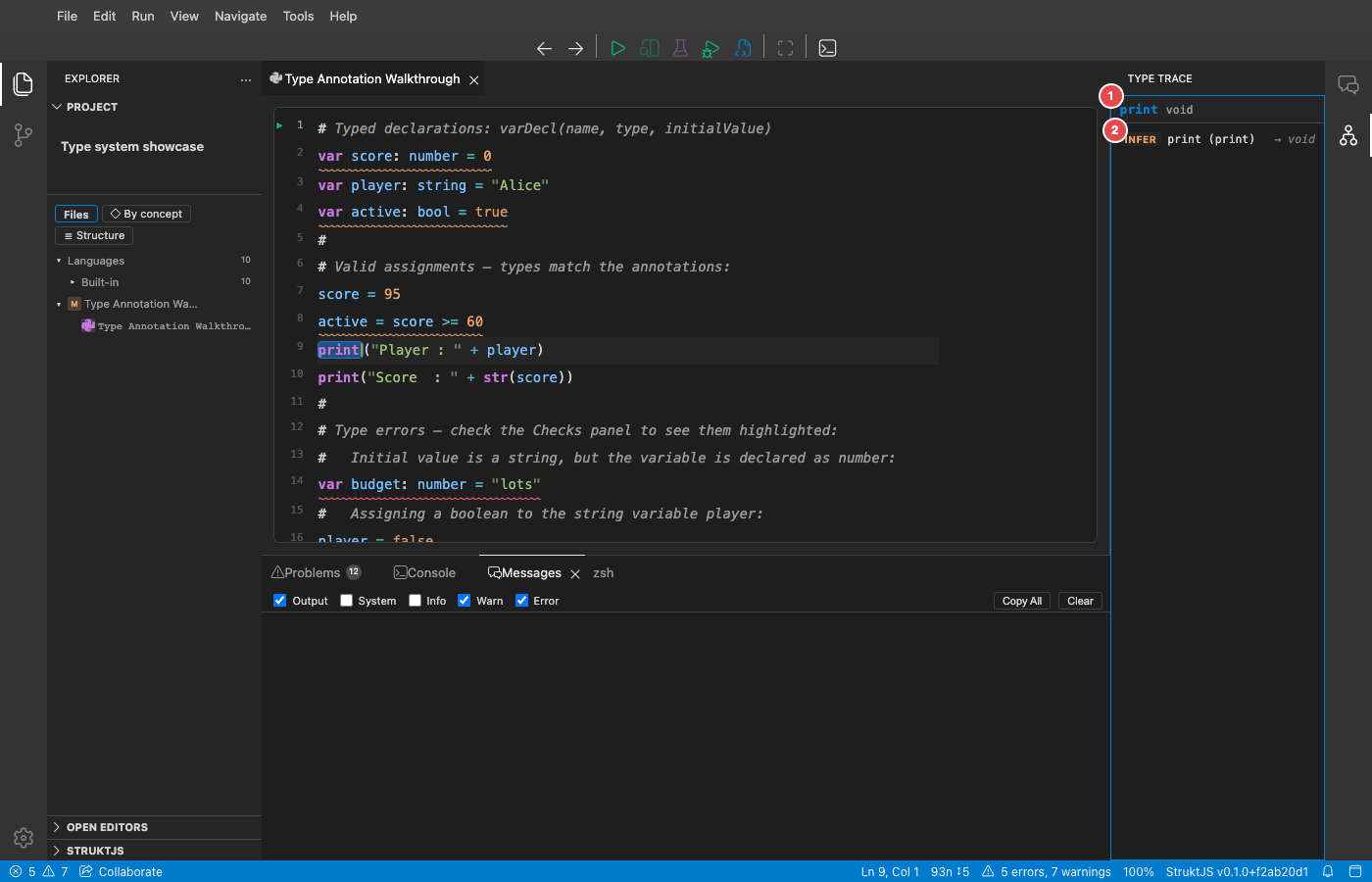
- Click a node in the editor (for example the
printkeyword). - Open View > Tool Windows > Right > Type Trace (in the menu simply View > Tool Windows > Type Trace) or press Ctrl/Cmd+K, V, T (command Toggle Type Inference Trace).
- The pane follows your selection. The top line shows the node's concept and its inferred type, for example
printandvoid. - Below it is a tree of the rules that were used. Click any line to jump to that node.
Each line has a badge: overload (a signature list decided it), infer (a concept's own rule), fn
return (the return type of a function call), no rule (nothing declared one: type is any) or no value
(a statement, which by design has no value). Indented rows with a label and value (for example declared: and
expr:) are extra facts a rule recorded. A "no rule" line carries a hint: "No typesystem rule declared for
'concept' — defaults to 'any'" or "'concept' is a statement — it produces no value to type, not a missing rule".
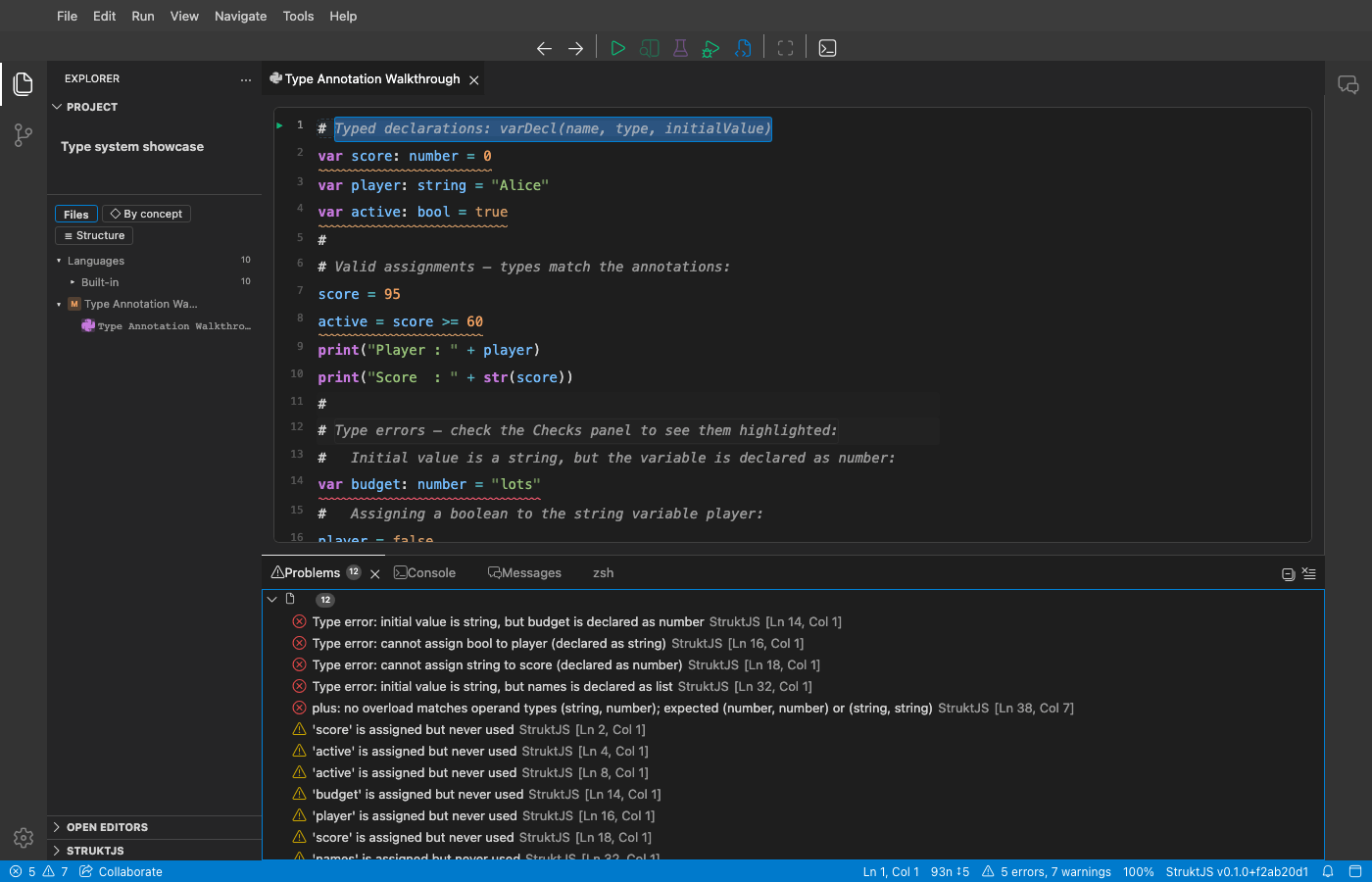
Open the Python language tour sample and its Type Annotation Walkthrough root (File > Samples > Load Sample…) to try it: it contains correct declarations and four deliberate errors.
Common messages and fixes
| Message (shape) | Meaning | Fix |
|---|---|---|
Type error: cannot assign bool to player (declared as string) |
A value of the wrong kind was assigned to a declared variable | Assign a value of the declared type, or change the declaration |
Type error: initial value is string, but budget is declared as number |
The initial value in varDecl does not fit |
Change the initial value or the declared type |
plus: no overload matches operand types (string, number); expected (number, number) or (string, string) or (list, list) or (tuple, tuple) |
An operator got operands no signature accepts, such as "Count: " + 5 |
Convert one side (str(5)), so both sides match |
Index: expected list, string or dict, got number / Index: index must be number, got string |
Wrong kind of thing indexed, or a wrong index | Index a list or string with a number, or a dict with its key |
Assert condition has type X, expected bool |
assert got a non-boolean |
Use a comparison |
module.method(): argument N expects X, got Y |
A library call got a wrong-typed argument | Pass the declared type |
Python habits the checker follows
The Core language follows Python where Python is deliberately loose:
- Truthiness.
not,andandortake any value, not only booleans:not [],x or defaultanda and bare fine.a and banda or bare aboolonly when both sides are; otherwise their type is unknown (any), as in Python where they give back one of the two values.ifandwhilestill warn about a text literal as the condition (while "go":). Noneis a placeholder.x = Noneonly reserves the name: a laterx = 5is fine, and from then onxis a number (a third assignment of a text is the error). AssigningNoneto a variable that already has a type (os = Noneafterimport os, the usual fallback of an optional import) is fine too. Other changes of type (x = 1, thenx = "a") are still reported.- A loop variable outlives its loop. After
for t in xs: ...the nametis still bound in the same function (it is not defined in another function). Names of a comprehension stay inside it.
If a message seems wrong, select the node and read the Type Trace; the line with the unexpected result shows
which rule produced it. When a type is simply unknown, declare it with varDecl so the checker has something to
compare against.
Every control
| # | Button/Option | What it does | Shortcut | Gotcha |
|---|---|---|---|---|
| 1 | View > Tool Windows > Type Trace | Shows or hides the Type Trace pane (right side) | Ctrl/Cmd+K, V, T | Palette command: Toggle Type Inference Trace |
| 2 | Banner (concept and type) | Shows the selected node's concept and inferred type | — | Shows "No node selected", "(empty) — nothing to infer" or "Node not in tree" when there is nothing to trace |
| 3 | A trace line | Jumps to that node | Click | The tree is read-only |
| 4 | Badge on a line | Says which kind of rule decided (overload, infer, fn return, no rule, no value) | — | "no rule" is not an error |
| 5 | Edit > Copy & Report Info > Copy Inferred Type | Copies the type of the focused node | — | |
| 6 | Tools > Typechecker > Check Entire Project | Includes type problems for every model | Ctrl/Cmd+K, T, C | See Problems panel and checks |
| 7 | Language Editor > Types > Inference / Checking rules | Where a language author writes a concept's type rules | — | Language authors only |