Samples
Audience: newcomers and language authors · ~6 min read · Prerequisites: none
What it is
Samples are small example programs that ship with struktJS. Each one is a complete project you can open, edit and run. Generic Core samples teach the editor and its tools. Every bundled language also ships a demo model written in that language. The full, always-current list is generated: see Samples (generated list).
When you'd use it
- You are new and want something to click on immediately.
- You want a worked example of a feature (checks, the debugger, diagrams, decision tables).
- You are writing a language and want to see how a similar one is built.
Open a sample
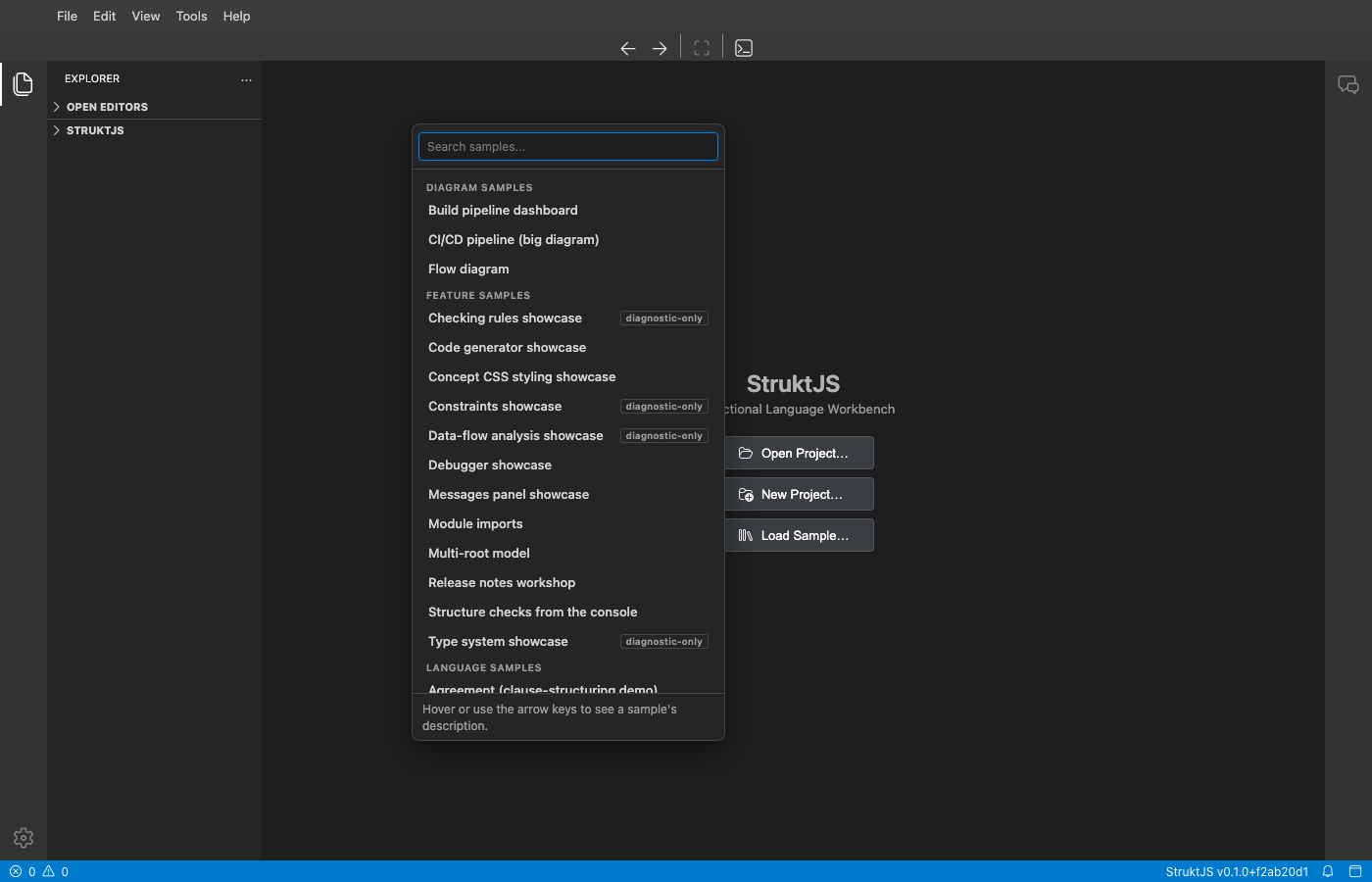
- Choose File > Samples > Load Sample…. The same entry is on the Welcome tab and the empty main area as Load Sample…. File > Samples > Browse All Samples… (Ctrl/Cmd+K, F, B) opens the same picker.
- A picker opens with a search box. Samples are grouped under Diagram samples, Feature samples, Language samples, Python samples and General samples. The group comes from the sample's
project.jsongroup; samples without one land in General. A sample that has no Generate output carries a "diagnostic-only" badge. - Type to filter by name or description. Use ↑ and ↓ to move; the description of the highlighted sample shows at the bottom. Press Enter, or click, to open it.
- The sample opens as its own project in a new tab. Its
README.mdis a file of the project like any other (open it from the Explorer).
File > Samples > Load Random Sample (no default shortcut) opens a random one. The picker also lists an extra Git History Demo: a real git repository with a few commits for the Source Control pane.
A sample is an ordinary project
A sample opens in place: the project you get is the sample's own folder, exactly as if you had chosen it with Open Project…. There is no copy, no reset and nothing special about it. Your edits are saved to that folder and are there next time; the sample is listed under recent projects like any other.
- In a development checkout the folder is in the repository (
samples/<name>/, or the demo's folder underplugins/), so git shows your edits andgit checkout samples/<name>takes them back. - In an installed app the sample files ship inside the app. When that place cannot be written (a macOS app bundle, Program Files), the first open makes one plain copy in
~/struktjs-samples/<name>/and opens that copy; delete it and open the sample again to start over. A server deployment can point at its own sample set with the environment variableSTRUKTJS_SAMPLES_ROOT(a folder holdingsamples/andplugins/). - Older versions kept copies in
~/.struktjs/samples/. The app removes that folder once, the first time it starts; anything you had edited there is gone.
A sample that ships a language of its own is the one exception to "nothing special": the language is shipped code, so it is trusted without a prompt as long as it is exactly the shipped text. A language you edit afterwards asks like any other.
Where samples live
| Kind | Folder in the repository |
|---|---|
| Generic Core sample | samples/<name>/ |
| Demo of one language | plugins/<plugin>/models/<name>/ (or hoisted so plugins/<plugin>/project.json is the project) |
| Sample with a language of its own | samples/<name>/ with <lang>.lang.js (and <lang>.concepts/) beside project.json; its language is part of the folder and yours to edit |
A sample folder holds project.json, an optional README.md, and the model (a model/ folder with model.json and the model files). They are found automatically; there is no list to maintain. A language's demo is shown once that language is available.
A short catalog
Start here (Python samples)
Hello world, Guess the number, Console Cookbook, Pattern matching, Decision table, Rich Doc Comments, Ruff linter showcase, Tricky syntax.
Feature showcases
| Sample | Shows |
|---|---|
| Python language tour | One model, six roots: static checks (fix the issues to see them clear), slot-level constraints, data flow (uninitialized variables, unreachable code), type annotations and mismatches, breakpoints and stepping (The Debugger), and structured log output (the Messages panel) |
| Code generator showcase | Generated Python alongside the model |
| Model-to-model: lowering a sum to add() | A project language with one model-to-model rule; Run Generator rewrites every sum into a call of add(...) (see Generators and Open Preview) |
| Generators tour | One small invoice language and every kind of generator rule: text, indented text, function, files, a named export, rule imports from a library model, a concept's own reduce(self), and a generator plan (see Generators and Open Preview) |
| Multi-root model | One model with two roots |
| Module imports | Importing standard-library modules with completion |
| Concept CSS styling showcase | Styling concepts in the Language pane |
| Structure checks from the console | The Model Console |
| Release notes workshop | Spell check, model listeners, saved versions, Explorer views |
| Tax calculation (VAT on an invoice) | KernelF money with a rounding policy, a rate table, 18 tests, and Explain Result for every number |
Diagrams and notations
Flow diagram, CI/CD pipeline (big diagram), Build pipeline dashboard, Notation switching demo, Math Notation (2D formula demo), Heating (thermostat decision table demo), UI Kit demo. See Notations and views.
Language demos
Languages are grouped in the Bundled languages tour. Examples: KernelF (functional expression language), Maze Explorer (grid-world scripting demo) (runs in a preview), Lambda Calculus, Money, Aurora C500 (a printer described in real units, with print jobs checked against it), Entities, JSON, XML, JS Grammar Demo and TypeScript Grammar Demo (models stored as .model.js/TypeScript text), The Simplest Language and Shapes / Shapes3D (smallest and extended languages), Hover Tooltips.
Octo is not a sample but a project of its own, kept in the separate octo-mvp repository (its struktjs/ folder), the model behind the original Octo web app. Open that folder (Welcome > Open Project…) to see and edit it: the questionnaire (versions 1–4 with their old meanings, and since version 4 the moments, types of day, when each question is asked, its wording variants and the names of its options), the check-in shape, the validation rules with example scenarios, the record kinds (their forms, option labels and date rules), the learning gate and guardrails, the access limits, the accounts, the texts the app shows, the demo and the app's Screens (Run > Open Preview gives a clickable app), each a root of its own kind with its own name, plus the stored data and the riders (riders; all rider data is fictional). The scenarios are tests (Run Tests or strukts test --project-dir ../octo-mvp/struktjs). The web app reads the same folder through strukts serve: change a question, an option label, a limit or a text in the rules model and the running app shows it on its next load (docs/octo-model-driven-plan.md). Authentication is not modelled; limits are declared only.
Every control
| # | Button/Option | What it does | Shortcut | Gotcha |
|---|---|---|---|---|
| 1 | Load Sample… | Opens the picker | none (File > Samples) | Also on the Welcome tab |
| 2 | File > Samples > Browse All Samples… | The same picker | Ctrl/Cmd+K, F, B | Also in the command palette. In the webview preview it is under File. |
| 3 | Search box | Filters by name, description | type | Matches substrings |
| 4 | ↑ / ↓ / Enter / Esc | Move, open, close | keys | Esc closes the picker |
| 5 | Load Random Sample | Opens a random sample | ||
| 6 | "diagnostic-only" badge | Marks samples with no Generate output | none | Generate is disabled for them |