Model-aware diff
Audience: anyone comparing versions of a model · ~8 min read · Prerequisites: Source Control pane
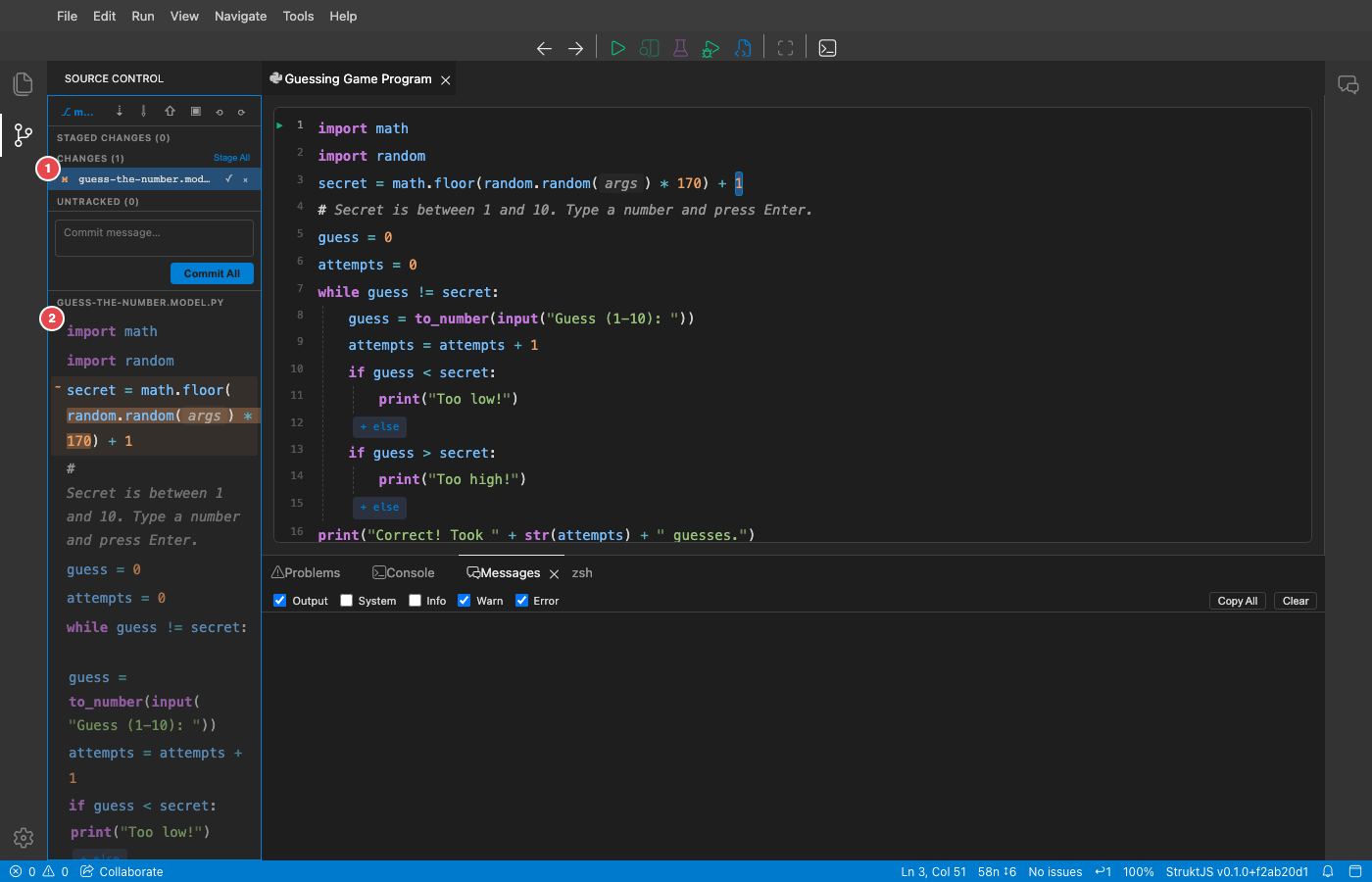
What it is
A normal diff compares lines of text. A model-aware diff first parses both versions into trees (see the glossary) and then compares the trees node by node. Moving a line or reformatting does not look like a change; changing one number three levels deep shows only that number. struktJS has this for comparing, and for resolving a merge conflict in a model file: the three versions git keeps are merged as trees and you decide only the nodes that really overlap, see Resolving conflicts.
When you'd use it
- Before you commit, to check what an edit really changed.
- To see what an old commit did.
- To compare two models in the same project.
How it matches nodes
- Statements that are exactly equal on both sides, in the same order, are matched first and shown as unchanged.
- In the gaps between them, remaining statements are paired by their kind (for example "assignment" with "assignment") and compared inside. This is what turns "removed and added" into one changed entry.
- Anything left over is added or removed.
| Change | What you see |
|---|---|
| Identical text | Nothing: "No structural changes." |
| A statement appended | One added row (+). |
| A statement deleted | One removed row (-). |
x = 1 changed to x = 2 |
The assignment row with only the changed node highlighted. Hover the highlight for the old value. |
A file holds several models under ## model: name headers |
One header per changed model. |
Rows are drawn with the language's own editor look. Unchanged rows are dimmed, added rows are green with +,
removed rows red with -, changed rows orange with ~.
If either side cannot be parsed, the diff shows an error ("Could not parse the previous revision: ...") instead. In the Source Control pane a file that cannot be compared falls back to the plain text diff.
Four ways to compare
1. In the Source Control pane
Click a changed model file. Files that are not model files (for example model.json) get the text diff.
Commits in the history use the same viewer. See Source Control pane.
2. Compare two models: Compare Model With…
- In the Project tree (Explorer), right-click a model.
- Choose Compare Model With….
- Pick the other model from the search list.
A dialog titled Compare "A" with "B" lists one section per pair of roots. Roots are paired by position
(first with first), not by name. If one model has more roots, a note says which are left out. The menu item
is missing when the project has no other model.
3. Compare with Saved
The command Compare with Saved (Ctrl/⌘+K, F, D) opens Theia's ordinary text diff between the file on disk and what the editor currently shows. This one is a text diff, not a tree diff.
4. Named versions of a root
Commands under Tools > Versions (they appear while a model is open) keep labelled snapshots next to the model, without git:
- Save Version of Active Root… asks for a label (default
v1,v2, ...) and saves the current root. Labels must be unique per root. - Compare Active Root With Version… lets you pick a version and reports counts in a message, for example "3 added, 1 removed, 2 changed", with one detail line per change in the Messages panel.
- Browse Versions of Active Root… lists saved versions (label, time, node count, whether it equals the current content), compares one, or deletes one.
Versions live in a versions.json file in the model's folder, so you can commit it. Without a real file system
(plain browser preview), or in a bundled sample project (whose files are read-only), they are kept in browser storage instead. None of these commands changes the model.
Every control
| # | Button/Option | What it does | Shortcut | Gotcha |
|---|---|---|---|---|
| 1 | Changed file row (Source Control) | Opens the tree diff for a model file. | Click again to close. | |
| 2 | Diff area | Shows + added, - removed, ~ changed, blank unchanged. |
Scrolls inside the pane. | |
| 3 | Compare Model With… | Tree diff between two models, root by root. | Pairing is by position. | |
| 4 | Compare with Saved | Text diff of disk vs editor. | Ctrl/⌘+K, F, D | Not a tree diff. |
| 5 | Save Version of Active Root… | Snapshots the active root under a label. | Duplicate label is refused. | |
| 6 | Compare Active Root With Version… | Reports added/removed/changed counts. | Detail lines go to Messages. | |
| 7 | Browse Versions of Active Root… | List, compare, delete versions. |
History of one node
Right-click a node and choose Git Annotate. The panel shows the commit that last changed that node, and under History every commit that touched it, newest first, ending at the commit that introduced it. A line says when the working tree has uncommitted changes to the node. Nodes are followed through reordering and through unrelated statements being added or removed above them. If the trail cannot be followed reliably (for example across a history rewrite) the list stops and says that older history could not be tracked, rather than guess.