Preferences
Audience: everyone · ~10 min read · Prerequisites: Screen map
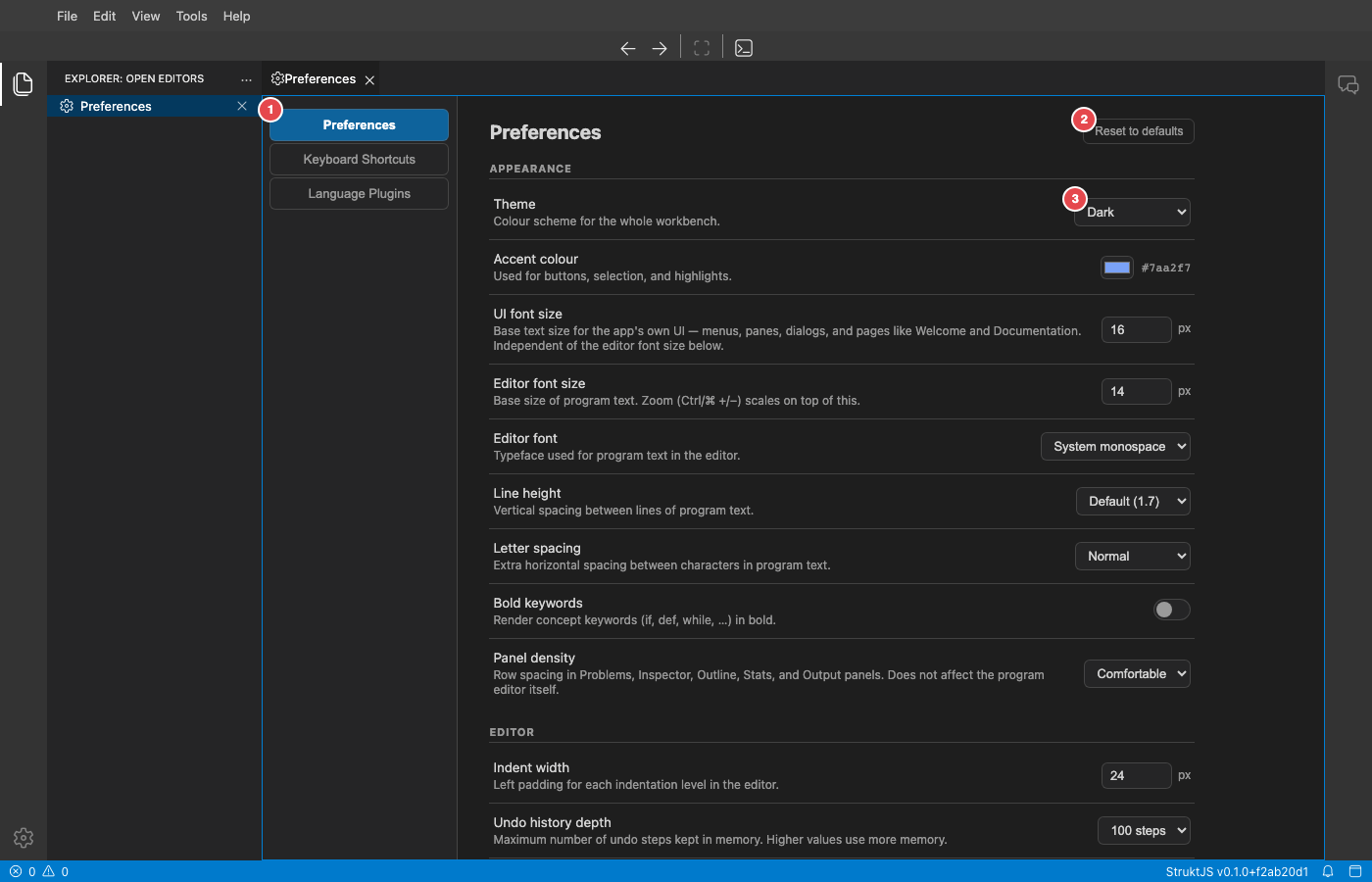
What it is
A preference is a setting that changes how struktJS looks or behaves: font size, whether it asks before destructive actions, which relay server collaboration uses, and so on. struktJS has 37 of them, grouped as Appearance, Editor, Behaviour, Advanced, Collaboration and Output. Fonts, theme and keyboard shortcuts have their own pages: Themes and appearance and Keybindings. The complete generated table (key, default, range) is in the Preferences reference.
When you'd use it
- Text is too small or too large on your screen.
- You want fewer confirmation prompts, or more.
- You use a self-hosted collaboration relay.
- You want auto-save, timestamps in the output log, or line numbers off.
Where to change them
In the Theia IDE, struktJS has no settings page of its own: its preferences are part of Theia's own Settings editor.
Choose File > Preferences > Settings (Ctrl/Cmd+,), or struktJS Settings… (Command Palette), which opens the
same editor already searched for struktJS. Pressing Settings on the Welcome page opens it too. struktJS appears as its own
category with sub-sections Appearance, Editor, Behaviour, Output, Collaboration and Advanced. Because it is the same editor used for all of
Theia, you can also set values per workspace and edit settings.json directly.
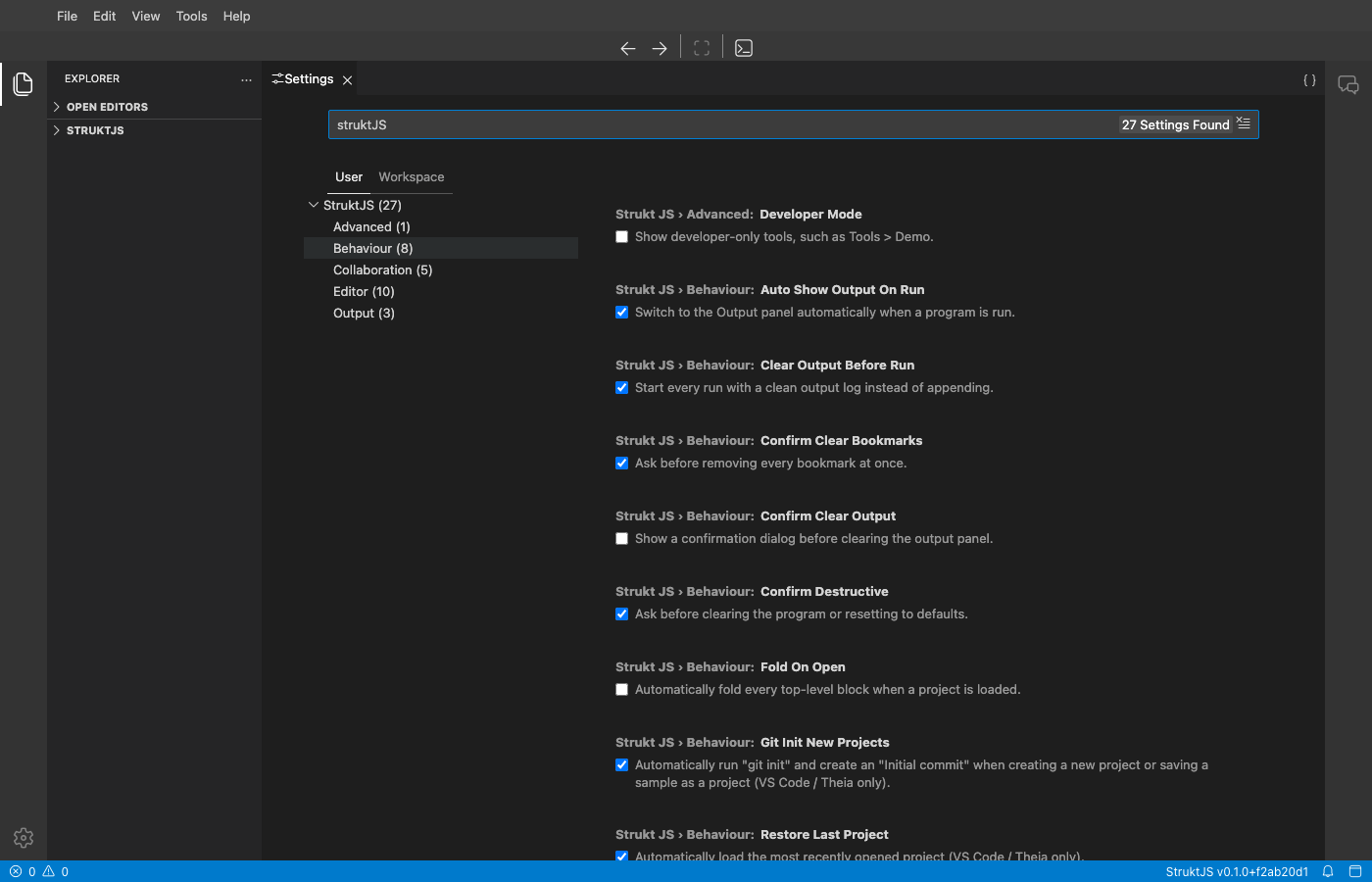
Every preference below that shows a Theia setting id (like struktJS.behaviour.confirmDestructive) is there, and it stays in sync with
the menu toggle commands. Only the theme and accent colours are not: in the IDE they come from Theia's Color Theme. For the
look-and-feel items that Theia itself also has (editor font size, font, line height, letter spacing, tab size, line numbers), see
Which setting wins below. Keyboard shortcuts are not preferences; they are in File > Preferences >
Keyboard Shortcuts (see Keybindings).
In the standalone web preview (not the IDE) the same preferences are the Settings view of that preview; there is no Theia Settings editor there.
How to change a preference
- Choose File > Preferences > Settings and type
struktJSin the search box (or run struktJS Settings…). - Find the setting (for example Editor: Indent Width). Theia labels each one section: name.
- Change the control: a switch for on/off, a drop-down for a fixed choice, or a number or text box (values outside the allowed range are clamped to it).
- The change is saved straight away. There is no Save button.
You can also flip many on/off preferences from the menu or the Command Palette (F1), see Commands that change a preference.
Where your settings are stored
- In the IDE, preferences live in Theia's settings (the per-user
settings.json, or the workspace's), which is shared across browsers on the same backend. Older installs also keep a copy in the browser's local storage for this IDE address. - In the standalone web preview, values are in the browser's local storage for that address. A different browser, a private window or a
different
localhostport starts with defaults. - Collaboration and other sessions never copy your preferences to other people. See Live collaboration.
Which setting wins
Theia has its own editor settings (editor.fontSize, editor.fontFamily, editor.lineHeight,
editor.letterSpacing, editor.tabSize, editor.lineNumbers). If you have explicitly set one of them in
Theia, it takes over the matching struktJS setting: Appearance: Editor Font Size, Editor Font, Line Height,
Letter Spacing, Editor: Indent Width, Show Line Numbers. Each of those settings says so in its description. A
Theia setting you never touched does not override anything. View > Font Size > Increase / Decrease Editor Font step the size that is shown now (by one point, 10 to 28) and Reset Editor Font Size goes back to the default; when you have set editor.fontSize in Theia, the Messages panel says that setting wins and the commands cannot change the size. Theia's editor.cursorStyle,
editor.cursorBlinking and editor.fontLigatures are also forwarded when you set them.
Every preference
Each row names the control exactly as shown on the page. Why change it is our suggestion; the default is
fine for most people. "Theia id" shows the settings.json key where one exists, otherwise —.
Appearance
| # | Preference (key) | What it does | Default | Why change it | Theia id |
|---|---|---|---|---|---|
| 1 | Theme (theme) |
Colour scheme for the standalone web preview. In the Theia IDE use File > Preferences > Color Theme instead. | Dark | To follow your OS in the standalone preview. Not shown in the IDE, where the colours come from Theia's colour theme: see Themes and appearance. | — |
| 2 | Accent colour (accent) |
Used for buttons, selection, and highlights in the standalone web preview. In the Theia IDE the accent comes from the Color Theme (focusBorder). | #7aa2f7 |
Branding or contrast in the standalone preview. Not shown in the IDE. | — |
| 3 | UI font size (uiFontSize) |
Text size of menus, panes, dialogs and pages (12 to 22 px). | 16 | Readability. Independent of the editor size. | struktJS.appearance.uiFontSize |
| 4 | Editor font size (editorFontSize) |
Base size of program text (10 to 28 px). Zoom scales on top. | 14 | Readability. | struktJS.appearance.editorFontSize |
| 5 | Editor font (fontFamily) |
System monospace, JetBrains Mono, Fira Code, Menlo / Consolas or System sans-serif. | System monospace | Personal taste. JetBrains Mono and Fira Code must be installed on your computer. | struktJS.appearance.editorFont |
| 6 | Line height (lineHeight) |
Tight (1.3), Cozy (1.5), Default (1.7) or Relaxed (2.0). | 1.7 | Fit more lines, or more air. | struktJS.appearance.lineHeight |
| 7 | Letter spacing (letterSpacing) |
Normal, Loose (0.3px) or Wide (0.6px). | Normal | Dyslexia-friendly or dense text. | struktJS.appearance.letterSpacing |
| 8 | Bold keywords (boldKeywords) |
Draws concept keywords (if, def, while) in bold. | off | Easier scanning. | struktJS.appearance.boldKeywords |
| 9 | Panel density (uiDensity) |
Comfortable or Compact row spacing in Problems, Inspector, Outline and Output. | Comfortable | Show more rows. Does not affect the editor itself. | struktJS.appearance.uiDensity |
| 10 | Workbench text size (workbenchTextSize) |
Standard (the default) draws the Theia workbench itself (explorer, tabs, panel headers, Messages, status bar) exactly halfway between Small (Theia's compact 13 px) and Large (the UI font size above). | Standard | Readability on large or high-resolution screens. In the IDE only; the standalone preview always follows the UI font size. | struktJS.appearance.workbenchTextSize |
Automatic scaling
Until you move UI font size or Editor font size away from its default, the effective size grows or shrinks slightly with your window width (between 90% and 125%, 100% at 1440 px wide), so large monitors get larger text. Once you pick your own value, it is used exactly.
Editor
| # | Preference (key) | What it does | Default | Why change it | Theia id |
|---|---|---|---|---|---|
| 10 | Indent width (indentSize) |
Left padding per indentation level (8 to 48 px). | 24 | Flatter or deeper nesting. | struktJS.editor.indentWidth |
| 11 | Undo history depth (maxUndoSteps) |
How many undo steps are kept: 50, 100, 200 or 500 steps. Each step is a full copy of the model, so a very large model keeps fewer (about 8 for 120,000 nodes, never fewer than 3) to stay within memory. | 100 | More steps use more memory. | struktJS.editor.maxUndoSteps |
| 12 | Default zoom (defaultZoom) |
Zoom applied at startup (50 to 200 %). | 100 | Start larger or smaller. | struktJS.editor.defaultZoom |
| 13 | Show breadcrumbs (showBreadcrumbs) |
Shows the path from the root to the focused node above the editor. | off | Orientation in deep models. | struktJS.editor.showBreadcrumbs |
| 14 | Show line numbers (showLineNumbers) |
Line numbers and fold chevrons in the gutter. The chevron is always visible and its whole box is a click target. | on | Cleaner look, or turn off. | struktJS.editor.showLineNumbers |
| 15 | Rainbow indent guides (rainbowIndents) |
Gives each indentation level its own colour. | off | Seeing block depth. | struktJS.appearance.rainbowIndents |
| 16 | Inline error lens (errorLens) |
Shows the first error or warning right after the problem node. | off | See problems without the Problems panel. | struktJS.editor.errorLens |
| 17 | Jump to first error after run (autoNavToError) |
After a run, moves to the first check error. | off | Faster fix loop. | struktJS.editor.autoNavToError |
| 18 | Wrap sibling navigation (wrapNavigation) |
Next/previous sibling wraps at the ends instead of stopping. | on | Stop at the ends. | struktJS.editor.wrapNavigation |
| 19 | Spell-check language (spellcheckLocale) |
English or Off, for free text in languages that support it (for example Changelog entries). | English | Turn off for non-English text. | struktJS.editor.spellcheckLocale |
| 20 | Center node on navigation (autoCenterOnFocus) |
Scrolls a navigated-to node to the vertical centre. | off | Less eye movement. | struktJS.editor.autoCenterOnFocus |
| 21 | Operator hints at cell edges (sideTxHints) |
Shows a marker beside the focused cell when an operator typed there would wrap it, and lists the keys while Alt is held. | on | Turn off once you know the keys. | struktJS.editor.sideTransformHints |
| 21a | Space opens the what-can-come-next menu (spaceOpensContinuation) |
Pressing Space at the end of a finished value opens a menu of the operators and postfix forms that can follow it (see Operators and side-transformations). | on | Turn off to keep Space a plain key there. | struktJS.editor.spaceOpensContinuation |
| 21b | Ghost text instead of the completion menu (ghostText) |
In an empty cell the completion menu stays out of sight until Ctrl+Space, and when exactly one candidate continues what you typed, its remainder shows greyed after it; Right arrow or Enter accepts it. | on | Fewer pop-ups while typing names you know. | struktJS.editor.ghostText |
| 21c | Faint box around the node under the caret (focusBox) |
A faint dotted box around the node the caret is in, the smallest one around it that is bigger than the cell. | off | Shows what an edit or a selection step will touch. | struktJS.editor.focusBox |
| 21d | Hold back errors while typing (errorTiming) |
An error on the node you are typing into waits until the caret leaves it or pauses for about a second; warnings and the Problems list are unaffected. | off | A half-typed name is not flagged. | struktJS.editor.errorTiming |
| 21e | Fade hints once you know them (fadeHints) |
After you have typed an operator over a value about five times, the small + markers beside the focused cell stop appearing; holding Alt still lists the keys. |
off | Less clutter for people who know the keys. | struktJS.editor.fadeHints |
| 21f | Show live values after declarations (liveValues) |
While you edit, the program runs in the background (output swallowed, time limited) and the value of each top-level declaration shows dim after its line. | off | See what a change did without running. | struktJS.editor.liveValues |
Inferred types under binders (typeSubscripts, struktJS.editor.typeSubscripts, off by default) shows the type the language's type system inferred as small, quiet text beneath variable declarations and parameters. Nothing is shown where the type is unknown.
Behaviour
| # | Preference (key) | What it does | Default | Why change it | Theia id |
|---|---|---|---|---|---|
| 21 | Confirm destructive actions (confirmDestructive) |
Asks before clearing the program or resetting to defaults. | on | Turn off if you trust undo. | struktJS.behaviour.confirmDestructive |
| 22 | Clear output before each run (clearOutputBeforeRun) |
Starts each run with an empty output log. | on | Turn off to keep history. | struktJS.behaviour.clearOutputBeforeRun |
| 23 | Reopen last project on startup (restoreLastProject) |
Loads the most recent project automatically (IDE only). | on | Turn off to always see Welcome. | struktJS.behaviour.restoreLastProject |
| 24 | Enable version control for new projects (gitInitNewProjects) |
Runs git init and makes an "Initial commit" when you create a project or save a sample as one (IDE only). |
on | Turn off if the folder is already in a repository. | struktJS.behaviour.gitInitNewProjects |
| 25 | Confirm before clearing output (confirmClearOutput) |
Confirmation before clearing the Output panel. | off | Avoid accidental clears. | struktJS.behaviour.confirmClearOutput |
| 26 | Fold all on model open (foldOnOpen) |
Folds every top-level block when a project loads. | off | Big models: start with an outline. | struktJS.behaviour.foldOnOpen |
| 27 | Show output panel on run (autoShowOutputOnRun) |
Switches to the Output panel when you run. | on | Turn off if you keep it hidden. | struktJS.behaviour.autoShowOutputOnRun |
| 28 | Python runtime (pythonRuntime) |
Which Python runs your programs: Automatic, Python on this computer, or Built-in Python (Pyodide). | Automatic | Automatic uses the Python installed on this computer and falls back to the built-in WebAssembly Python (downloaded once, after asking) when there is none. Choose Built-in to run sandboxed, without access to this computer's files. | struktJS.python.runtime |
| 29 | Confirm clearing all bookmarks (confirmClearBookmarks) |
Asks before removing every bookmark. | on | Skip the prompt. | struktJS.behaviour.confirmClearBookmarks |
| 30 | Re-verify models while editing (verifyOnEdit) |
After you stop typing in a model you have verified once, re-runs Verify Model in the background so the Explorer badge and status bar stay current. | on | Turn off if your tests are slow. | struktJS.behaviour.verifyOnEdit |
| 31 | Large model warning threshold (largeModelThreshold) |
A model with more nodes than this is not drawn until you choose Open collapsed or Open everything, because drawing a very large model can freeze the page for many seconds. 0 never asks. | 15000 | Raise it on a fast machine, or set 0 to always draw everything. | struktJS.behaviour.largeModelThreshold |
| 30a | Open README.md when opening a project (autoOpenReadme) |
Opens the project's (or a sample's) README.md in a preview tab beside the editor whenever you open it. | off | Turn on if you want the README shown every time. | struktJS.behaviour.autoOpenReadme |
Advanced
| # | Preference (key) | What it does | Default | Why change it | Theia id |
|---|---|---|---|---|---|
| 32 | Developer mode (developerMode) |
Shows the developer-only Tools > Demo submenu (a progress-notification demo). Nothing else changes. | off | Only if you work on struktJS or a language. | struktJS.advanced.developerMode |
| 33 | Report type rule failures (typeRuleFailures) |
When a language's type rule throws while checking your program, shows it as a problem on that node (Warning, the default; or Error) instead of silently treating the node as untyped. Off restores the old silent behaviour. | Warning | You write or debug a language's Types tab. Switch it off if a language you only use keeps reporting a rule you cannot fix. | struktJS.advanced.typeRuleFailures |
Collaboration
Used by Live collaboration. These are also the settings under Collaboration in Theia's Settings editor.
| # | Preference (key) | What it does | Default | Why change it | Theia id |
|---|---|---|---|---|---|
| 34 | Relay server URL (collabServerUrl) |
The relay used by Share Model Session (Live)… and Join Model Session (Live)… (not Theia's stock Collaboration: Share Workspace…, which has its own server setting). | http://localhost:8100/ |
Point at your team's relay. | struktJS.collaboration.serverUrl |
| 35 | Follow host's tool-panel selection (collabFollowHostPanes) |
As a guest, whether to mirror the host's right/bottom panel. Automatic (follow by default), Always follow or Never follow. | Automatic | Never, if host-driven pane switches interrupt you. | struktJS.collaboration.followHostPanes |
| 36 | Sync theme with host (collabSyncTheme) |
As a guest, temporarily match the host's dark/light mode. | off | Demos and pairing. Never saved. | struktJS.collaboration.syncTheme |
| 37 | Allow plain-HTTP relay on a local network (collabAllowInsecureRelay) |
Accepts http/ws to a private-network relay (192.168.x.x, 10.x.x.x, 172.16-31.x.x, link-local, *.local). |
off | A self-hosted LAN relay without TLS. Traffic to the relay is unencrypted. | struktJS.collaboration.allowInsecureRelay |
| 38 | Allow collaboration without a secure connection (collabAllowInsecureCryptoFallback) |
Lets collaboration work over plain HTTP on a LAN address, using slower software encryption. | off | Only on a network you trust. | struktJS.collaboration.allowInsecureCryptoFallback |
Output
| # | Preference (key) | What it does | Default | Why change it | Theia id |
|---|---|---|---|---|---|
| 39 | Show timestamps (outputTimestamps) |
Prefixes each output line with HH:MM:SS. | off | Timing runs or debugging. | struktJS.output.timestamps |
| 40 | Max output lines (outputMaxLines) |
Keeps only the last N lines: Unlimited, 200, 500 or 1000. | Unlimited | Chatty programs. | struktJS.output.maxLines |
| 41 | Auto-save interval (autoSaveInterval) |
Saves the open model on a timer when there are unsaved changes: Off, 30 s, 1 min or 5 min. | Off | Safety net. Works only for a model saved in a project. | struktJS.output.autoSaveInterval |
Three more Theia-only settings
Three settings exist only in Theia's Settings editor (search struktJS). The first two are look-and-feel, under the Editor section:
| Setting | What it does | Default |
|---|---|---|
struktJS.editor.cornerStyle |
Roundness of boxes, badges and popups: default, sharp or round. Switches and dots stay round. |
default |
struktJS.editor.reduceMotion |
Turns off hover, selection and panel-resize animations. | off |
struktJS.git.sourceControlView |
Which Source Control UI to show: theia (the standard Theia view with struktJS diffs and conflict resolution) or struktjs (the struktJS pane, which also has branches, stash and history). Takes effect after reloading the window. See Source Control pane. |
theia |
More in Themes and appearance.
Commands that change a preference
These commands flip or cycle a preference without opening any settings page. Run them from the menu where listed, or from the Command Palette (F1). Shortcuts are the Theia ones.
| Command | Changes | Shortcut |
|---|---|---|
| Toggle Confirm Destructive Actions | Confirm destructive actions | none |
| Toggle Reopen Last Project on Startup | Reopen last project on startup | none |
| Toggle Fold All on Model Open | Fold all on model open | none |
| Toggle Confirm Before Clearing Output | Confirm before clearing output | none |
| Toggle Confirm Clearing All Bookmarks | Confirm clearing all bookmarks | none |
| Toggle Developer Mode | Developer mode (shows or hides Tools > Demo) | none (also in File > Preferences) |
| Toggle Clear Output Before Run | Clear output before each run | none |
| Toggle Show Output Panel on Run | Show output panel on run | none |
| Toggle Jump to First Error After Run | Jump to first error after run | none |
| Toggle Output Timestamps | Show timestamps | none |
| Cycle Max Output Lines | Max output lines | none |
| Toggle Wrap Sibling Navigation | Wrap sibling navigation | none |
| Toggle Center Node on Navigation | Center node on navigation | none |
| Toggle Line Numbers | Show line numbers | none |
| Toggle Rainbow Indents | Rainbow indent guides | none |
| Toggle Inline Error Lens | Inline error lens | none |
| Toggle Bold Keywords | Bold keywords | none |
| Toggle Breadcrumbs | Show breadcrumbs | webview only (in the IDE use the Show breadcrumbs setting) |
| Cycle Editor Font | Editor font | none |
| Cycle Line Height | Line height | none |
| Cycle Letter Spacing | Letter spacing | none |
| Increase Editor Font / Decrease Editor Font / Reset Editor Font Size | Editor font size (10 to 28) | none |
| Toggle Follow Host (Panes), Toggle Sync Theme with Host | Collaboration follow options (session only) | see Live collaboration |
| Toggle Allow Collaboration Without a Secure Connection | Allow collaboration without a secure connection | none |
| Cycle Theme (Dark/Light/System), Theme: Dark, Theme: Light, Theme: Match System | Theme | webview only |
| struktJS Settings… | Opens Theia's Settings editor searched for the struktJS settings | none |
Gotchas
- A preference stored only in the struktJS page does not follow you to another browser; the ones with a Theia id do, through Theia's settings.
- "Reset to defaults" resets everything on the page, including preferences that also live in
settings.json(they are reset there too). - Some preferences say "IDE only" because the standalone web preview has no project folder to reopen or initialise.
- Collaboration settings change what you do when you share or join; changing them mid-session does not move an existing session to another relay.