Multi-file generation
Audience: everyone who ships generated code · ~6 min read · Prerequisites: Generators and Open Preview
What it is
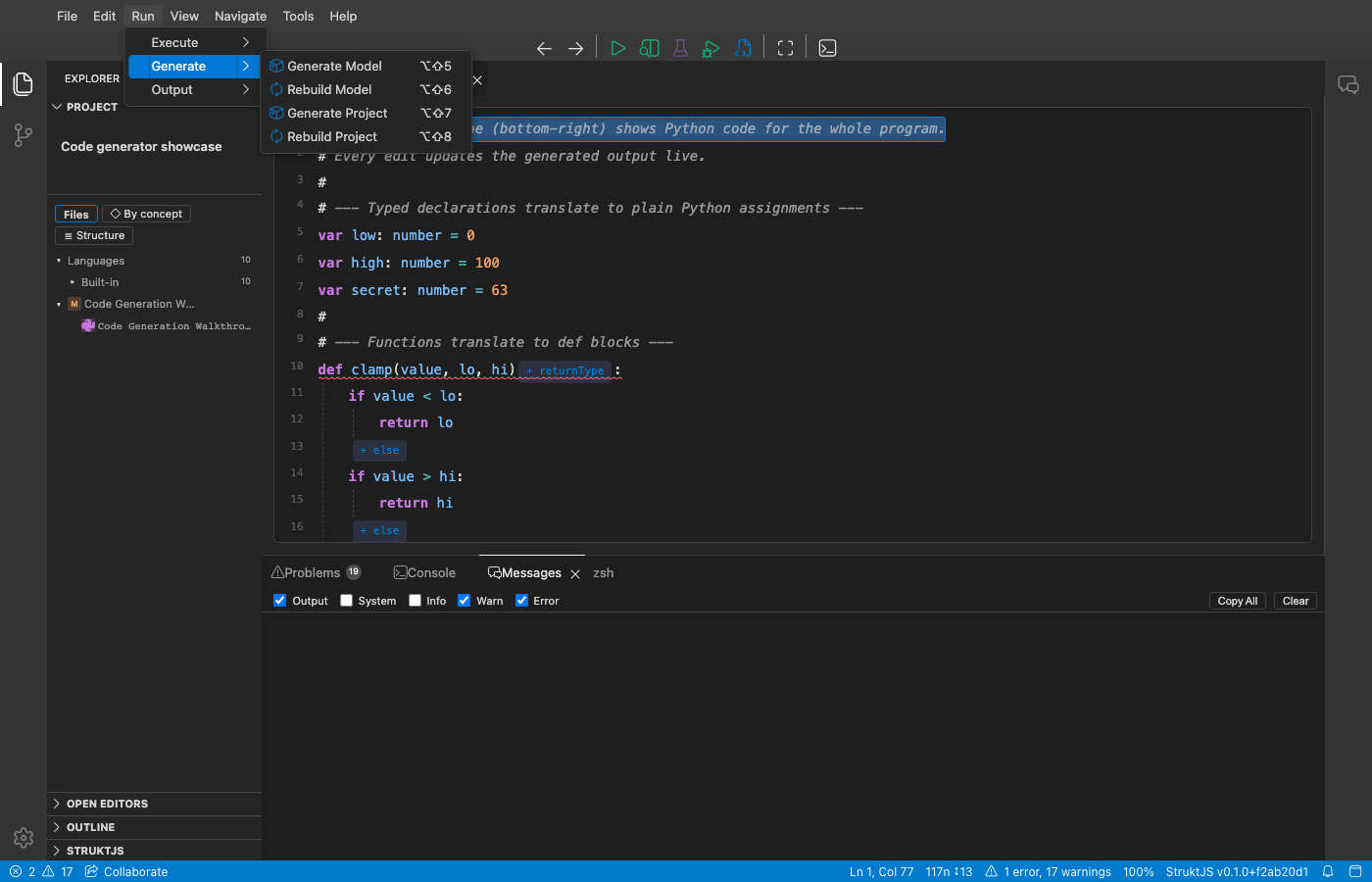
Where Run Generator shows the output for one root, the Generate commands run the generators over every
root of a model, or every model of the project, and write real files to disk. Each root becomes one file. By
default the files go into a generated/ folder inside each model's own folder, never beside your hand-written
model files.
When you'd use it
- You want the generated Python or JavaScript as files for a build, a repository or a deployment.
- You want to regenerate everything after a change, from a clean slate.
How to use it
- Choose a command from Run > Generate:
- Generate Model (Ctrl/Cmd+F9): every root of the active model.
- Rebuild Model (Ctrl/Cmd+Shift+F9): deletes the model's output folder first, then generates.
- Generate Project (Ctrl/Cmd+K, R, P): every model of the active project (not other attached projects).
- Rebuild Project (Ctrl/Cmd+K, R, B): clean, then generate every model.
- When files were written, a notification reads
Generated N file(s) → <folder>/. Anything skipped is listed in the Messages view as<file>: <reason>, and generator warnings as<path>: <warning>. If there is nothing at all: "Nothing to generate." - Open the
generated/folder in the Explorer to see the files.
The same actions are on a model row of the Explorer (Generate, Regenerate, Clean), which work on the model you right-click without opening it; Generate there skips files that already exist, Regenerate overwrites, Clean deletes the output folder only. See The Explorer and Project pane.
Where the files go and what they are called
- Output folder:
outputin the model'smodel.jsonif set, resolved against the model's own folder (a..that would leave the project is stopped at the project root). Otherwise<model folder>/generated. - File name: the root's file name with
.model.pyor.model.jsreplaced by the language's output extension: the extension the language declares with the "generated extension" interface (for example.jsonor.xml), else.htmlfor HTML-preview languages, otherwise the extension of the language's file grammar (.pyfor Core). - A root with no known extension is skipped and the reason is reported.
What is skipped
| Reason shown | Meaning |
|---|---|
| model's language isn't loaded/resolved | Open the model once, or use Generate Project, which loads languages itself |
| language uses a generator plan, not supported by batch generation yet | Use Run Generator to view a plan's output |
| generator threw: ... | A generator rule failed on this root |
| project is read-only or has no writable backing store | The project is not on a writable disk, such as a bundled sample |
| output already exists (use Regenerate to overwrite) | Only from the Explorer's Generate |
A sample marked "generatable": false is not meant to be generated. Rebuild deletes the whole output folder,
so never point output at a folder that holds hand-written files.
Command line
strukts generate does the same headlessly for CI; see The strukts CLI.
Every control
| # | Button/Option | What it does | Shortcut | Gotcha |
|---|---|---|---|---|
| 1 | Run > Generate > Generate Model | Writes every root of the active model | Ctrl/Cmd+F9 | Overwrites files with the same name |
| 2 | Run > Generate > Rebuild Model | Deletes the model's output folder, then writes | Ctrl/Cmd+Shift+F9 | Deletes everything in that folder |
| 3 | Run > Generate > Generate Project | Writes every model of the project | Ctrl/Cmd+K, R, P | Not attached projects |
| 4 | Run > Generate > Rebuild Project | Clean then write for every model | Ctrl/Cmd+K, R, B | |
| 5 | Explorer model row: Generate / Regenerate / Clean | Same, for the right-clicked model | — | Generate keeps existing files |
| 6 | output in model.json |
Changes the output folder | — | Relative to the model's folder |