Model Console and the query language
Audience: power users and language authors · ~12 min read · Prerequisites: Editor basics, Models, roots and imports
What it is
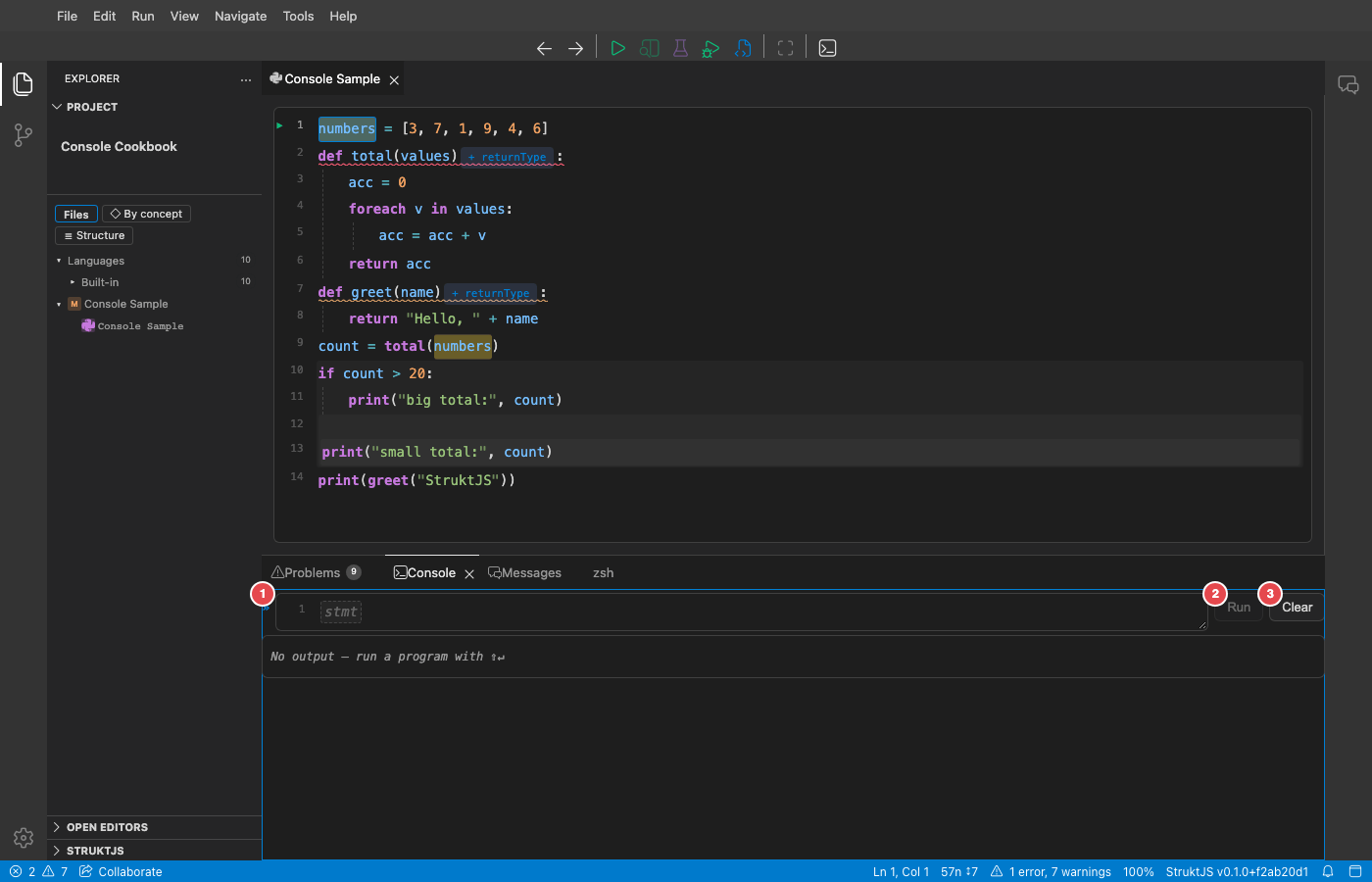
The Model Console is a projectional console docked at the bottom of the IDE. It is a small scratch editor where you write short queries against the model API and see the results at once. A query can navigate the live program tree, inspect nodes and (carefully) change them. Nothing you type is saved to a model file.
When you'd use it
- You want to count or list things ("how many
Timesexpressions are there?"). - You want to explore an unfamiliar model, or check a structure before writing a check.
- You want to make a bulk change that is awkward by hand.
How to open and run
- Open it from View > Tool Windows > Bottom > Console, or click the Console tab in the bottom strip.
- The input is itself a projectional editor with the same cells, navigation and Ctrl+Space completion as the main editor, bound to a scratch statement list. It accepts every ordinary statement (assignments, loops, function definitions) alongside the query expressions below, and is never saved to a model file.
- Shift+Enter, Ctrl+Enter or Cmd+Enter (or the Run button) evaluates every line against the live model.
- Up / Down on the first / last line recall earlier entries (restoring your draft when you step past the newest). Backspace / Delete on a recalled, unmodified entry removes it from the log. Esc resets the input. Clear empties the log.
- Results print in the log. A node or list of nodes shows as compact clickable labels (never a full live
projection); clicking one jumps to that node in the document. A model or
project.modelsentry is clickable too and opens that model.
The common operations, roots(...), nodes(...), .ancestor(...), .children(...), .descendants(...),
.where(...), .select(...), .foreach(...) and .size(), are real structural concepts, not free-typed
calls. Pick them from completion, or type the chain normally: after a filled receiver type ., the operation's
name and (, and it becomes the matching concept, ready for its filter cell. Typing . after model, node,
root or a chain from one restricts Ctrl+Space to that receiver's real members, which is a safe way to
discover what is available.
Concept names are always quoted strings ("Plus", not bare Plus; a bare identifier throws
Undefined variable). They are matched case-insensitively against stored concept heads.
Entry points
Every query starts from one of these:
| Entry point | What it gives you |
|---|---|
model |
The whole open model. Prints as its qualified name (for example console-cookbook). model.roots() returns every root, model.nodes("Plus") every matching node across all roots, model.name the display name, model.fqn the qualified name |
node |
The node currently selected in the editor, or null |
root |
The root currently open in the editor, as a ModelNode |
roots("Concept"?) |
Shorthand for model.roots(...) |
nodes("Concept"?) |
Shorthand for model.nodes(...): every node anywhere in the model, optionally filtered |
project |
The open project (read-only summary): .name, .description, .languages, .models ({name, filename, fqn}), .attachedProjects ({name, slug}) |
model/<name> |
Another model, by qualified name, older package-qualified name or bare name (alias otherModel in completion). Resolved across every open project; prefix <project-slug>/ to disambiguate |
project/<slug> |
Another open (attached) project (alias otherProject) |
print(value, ...) |
Write values to the log |
A root is a model's own structural top node (for example a PythonFile), never a statement inside it.
A model holds zero or more roots, each in its own file; see
Projects and models. To reach the statements inside a root use
root.children("stmts") (or .descendants(...), or model.nodes(...)), not roots().
Navigating a node
A single node is a ModelNode:
| Expression | Returns |
|---|---|
node.ancestor("Plus") |
Nearest enclosing Plus, or null |
node.ancestors() |
All enclosing nodes, closest first |
node.parent() |
The immediate parent, or null for a root |
node.children() / node.children("slot") |
Child nodes, optionally only those in a named slot |
node.descendants("Times") |
Every matching descendant (omit the argument for all) |
node.child("slot") |
First child node in a named slot, or null |
node.property("slot") |
Value of a primitive slot |
node.reference("slot") |
Variable name held by a reference slot, or null |
node.slots() |
The concept's slot names, kinds and cardinalities |
node.is("Plus") |
Concept check |
node.concept() |
The node's concept: chain .name (capitalised, such as "Plus"), .head, .description, .category, .slots() |
node.toJson() |
The node's subtree as JSON text ({head, children}, no ids) |
node.hash |
A content hash of the subtree (ignores ids): equal content, equal hash |
node.head / node.id |
The raw concept head; the internal id |
node.text |
The node's canonical (FullForm / KDL) text |
node.matchesStructure(pattern) |
Does the node match a structural pattern? |
node.assertStructure(pattern) |
Returns the captures, or throws naming the path to the first mismatch |
Printing a node shows its name property, or its concept's presentation when it has none.
Structural patterns
patterns holds the pattern builders (headMatch, capture, list, rest, sequence, seqItem, condition,
any, all, not, ...). assertStructure checks a node's shape and, on a mismatch, throws an error whose
message names where it went wrong, such as Structure mismatch at root.body[2].value: expected a "Plus" node, got a "Minus" node.
node.matchesStructure(patterns.headMatch("Plus"))
node.assertStructure(patterns.headMatch("Block"))      # raises with a path if it is not a Block
patterns.sequence(mode, items) matches a list slot's children as element patterns with cardinalities
(1, ?, *, +, 2..4, 2..n): exactly, allOrMore, allOrLess or noneOfThese, ordered or unordered.
patterns.condition("node.head === 'Plus'") matches by a JavaScript expression (with the same trust level as a
language's check bodies). The same operators exist as PSequence/PSeqItem/PCondition in the structural-pattern
editor used by a check rule's "+ Add structural pattern".
Working with collections
roots(), nodes(), children() and descendants() return a NodeList, an array with extra methods:
| Method | Description |
|---|---|
.size() / .isEmpty() / .isNotEmpty() |
Count and emptiness checks |
.first() / .last() |
First / last node, or null |
.where(lambda n: ...) |
Keep nodes where the predicate is truthy |
.select(lambda n: ...) |
Map each node to a value |
.foreach(lambda n: ...) |
Run a side effect per node (returns nothing) |
.descendants("Concept"?) / .ancestor("Concept"?) |
Flatten descendants / collect the nearest ancestor of every node |
Lambdas use the console's own Python-style lambda params: expr, not JavaScript arrows.
Examples
model.roots()                                     # the model's own root node(s)
model.nodes("Times").size()                       # how many Times expressions
model.nodes("Times").where(lambda n: n.children().size() > 2)
node.ancestor("Plus")                             # nearest Plus around the selection
nodes("Plus").foreach(lambda n: print(n.text))    # print each as FullForm
Changing the model
A few members write the live tree and refresh the editor, through the same mutation path structural edits use, so undo and autosave work as usual. Use them deliberately:
| Member | Effect |
|---|---|
node.set("slot", value) |
Set a property or structural child slot to a new value |
node.setReference("slot", "target") |
Point a reference slot at a variable name |
node.replaceWith(other) |
Replace the node in its parent |
node.insertBefore(other) / node.insertAfter(other) |
Insert a node as the sibling just before / after this one |
node.copy() |
A deep copy with fresh ids, attached nowhere; pass it to insertBefore, insertAfter or replaceWith |
node.usages() |
The references in this model bound to this node (a parameter, a loop variable, ...), by identity; not the node itself |
node.rename("name") |
Rename this declaration and every reference to it in this model; one refresh |
node.delete() |
Detach the node from its parent |
model.new("concept", { slot: value }) builds a detached node of a concept with its default shape, filling slots by name (an array for the variadic slot); model.ref(declaration) builds a reference node to a declaration (a node, or a name). Neither attaches anything: hand the result to insertBefore, insertAfter or replaceWith. A @refactoring method has the same two on its model.
| model.addRoot("Concept") | Append a new root of that concept (a new file in the model folder); never refuses because a root already exists |
Every control
| # | Button/Option | What it does | Shortcut | Gotcha |
|---|---|---|---|---|
| 1 | Input row (») |
A projectional editor for one or more statements and queries | Ctrl+Space completes | Concept names must be quoted strings |
| 2 | Run | Evaluates every line against the live model | Shift+Enter, Ctrl+Enter, Cmd+Enter | Disabled while the input is empty; its chip shows how many lines ran |
| 3 | Clear | Empties the result log | — | Does not clear the input |
| 4 | × (next to Run) | Resets the input to a blank entry | Esc | Only shown when there is input |
| 5 | Earlier entries | Recall into the input | Up / Down on the first / last line | Backspace / Delete on an unmodified recalled entry removes it from the log |
| 6 | Copy line button on a result | Copies that result line | — | |
| 7 | A node label in a result | Jumps to the node (or opens the model for a model entry) | Click | |
| 8 | ↑ newest | Scrolls the log to the newest entry (newest run is at the top) | Ctrl+Home | Appears when you have scrolled away. Ctrl+End, Ctrl+Up, Ctrl+Down also scroll the log |
| 9 | View > Tool Windows > Console | Shows the Console | — | Under Bottom |
| 10 | Clear Console, Copy Console, Export Console to File | Palette commands | Ctrl/⌘+K, O, D / Ctrl/⌘+K, O, C, C / Ctrl/⌘+K, O, X, C | See Output, Terminal and error messages |
Related
- Model API: how the console,
ModelNodeand the programmatic API relate. - API reference
- Output, Terminal and error messages
- Tutorial